

I am always curious about the latest gadgets for protecting cryptocurrency, and over the past few years, I have tried more hardware wallets than I care to admit. As someone who owns a few Bitcoins and a bunch of altcoins, I want a device that feels secure but doesn’t slow me down every time I need to send a transaction or check a balance.
Ledger’s announcement of two high‑end wallets: Ledger Flex and Ledger Stax. It got me thinking about where they actually fit in the market. Both promise “next‑generation” E‑Ink touchscreens and top‑tier security chips, yet their price tags are very different. I bought both and used them for several weeks to see how they stacked up in daily life.
The goal here is not to sell you anything. I want to share my unfiltered experience with both devices, what excited me, what annoyed me, and who I think each wallet suits best.
You’ll see me compare specs, build quality, user interface, battery life, storage space, and how each performs when juggling multiple coins.
Real‑World Testing Conditions: I set up both Ledger Flex and Stax wallets, loaded a handful of coins, and performed typical tasks like sending funds, staking, swapping tokens, and buying a small NFT. Along the way, I read what people on Reddit and forums said about both devices to help shape my conclusion.
My Flex vs. Stax Quick Comparison
To set the stage, here are the main differences and similarities between the two crypto hardware wallets. It’s easier to understand differences when you see them side by side. I’ll go deeper into each category later.
| Feature | Ledger Flex | Ledger Stax |
|---|---|---|
| Display | 2.84‑inch flat E‑Ink touchscreen, 16 shades of gray | 3.7‑inch curved E‑Ink touchscreen (bigger), 16 gray levels |
| Memory | 1.5 MB usable for apps (around 5–10 coins) | 1.8 MB total, about 1.1 MB free for apps |
| Battery & Charging | 10 hours active use; USB‑C charging only | Up to 10 hours; wireless Qi charging (10 W) |
| Connectivity | USB‑C, Bluetooth 5.2, NFC | USB‑C, Bluetooth 5.2, NFC |
| Weight & Size | ~57.5 g; 78.4 × 56.5 × 7.7 mm (credit‑card footprint) | ~170 g with case; 85 × 53 × 6 mm (slightly larger) |
| Security Chip | ST33K1M5 Secure Element, CC EAL6+ certified | Same ST33K1M5 Secure Element, CC EAL6+ |
| Price (approx.) | US $249 | US $399 |
| Extras | NFC sign‑in feature, magnetic attachment points | Wireless charging, magnetic stacking shell |
Design and Build Quality: How They Feel in Your Hand?
One of the first things you notice with a hardware wallet is how it feels in your hand. Ledger Stax looks like a premium gadget. Its curved E‑Ink display wraps around the spine and shows the wallet’s name even when it’s off. You can magnetically stack several Stax devices, which is neat if you own multiple wallets.
The aluminum frame and plastic back feel solid, and there’s a weighty confidence to it. When you add the magnetic shell case, it feels like holding a small e‑reader or Kindle.

Ledger Flex, by contrast, is smaller and lighter, closer to a thick credit card than a mini tablet. It has straight edges, flat glass on top, and magnets only for attaching accessories like a screen protector or folio case.
Still, the Flex is pocket‑friendly, and I often slipped it into my wallet or phone pouch without noticing it.

Well, I don’t always want to draw attention to my hardware wallet, so a low‑key design suits me. But if you enjoy showing off gadgets or have poor eyesight and want a larger display, the Stax might appeal more.
Build Quality Concerns
I haven’t dropped either wallet (thankfully), but I can say that the Stax’s curved glass might be more prone to cracking if it falls.
The Flex has a plastic frame that feels less premium but may handle drops better. The magnets on the Stax also attract dust and lint when stored in a pocket, whereas the Flex stays cleaner.
Screen Quality and Customization
Both wallets use E‑Ink displays with 16 levels of gray. They stay readable in bright sunlight, and they consume very little power when static.
In practice, the Stax’s 3.7‑inch curved screen is undeniably larger. You can personalise both devices with an image or your favourite NFT on the lock screen, but the Stax also lets you customize the spine. So, when the device is stacked on your desk, you can label the spine with a wallet name (“My Cold BTC,” “DeFi Play”).
On the Flex, the customization ends at the lock screen. You can’t label the side because there’s no curved screen; it’s purely flat. On the plus side, the smaller screen makes the Flex feel more durable.
User Interface and Responsiveness
A hardware wallet is only as good as its user interface, because you need to confirm addresses and amounts on the device itself. Here is where my experience diverged quite a bit.
Touchscreen Responsiveness
On paper, E‑Ink provides clear, paper‑like readability; but E‑Ink refresh rates are slow compared to OLED or LCD displays.
I knew this going in, but the difference between the two devices surprised me. The Ledger Stax suffers from noticeable lag. When you tap or swipe, there’s often a half‑second delay before the screen updates. During quick transactions, that delay feels clunky.
There were times when I tapped to confirm a transaction and wasn’t sure if it registered, so I tapped again. It feels like using an older e‑reader rather than a modern touch device.
Several Reddit reviews echo this complaint, with one user saying he “couldn’t imagine having a device smaller than Stax, yet still found it laggy and overpriced.”
The Ledger Flex isn’t lightning fast either, but it’s faster and more responsive than the Stax. Scrolling through menus, entering a PIN, and confirming transactions feel smoother.
I attribute this partly to the smaller screen; the device doesn’t have to refresh as many pixels. For someone like me who frequently moves funds, that speed difference matters. Obviously, you don’t want to wait for your crypto wallet when the market is moving.
Clear Signing and Readability
Both devices support Clear Signing. It’s a feature that translates complex smart contract data into human‑readable messages. Hence, this reduces the risk of signing malicious transactions.
On the bigger Stax screen, the transaction details are more spread out, and you can see more information at once. It’s easier to check an NFT contract address or verify the gas fee.
The Flex still shows all the necessary details, but you may need to scroll more.

NFC and Passkey Authentication
I appreciated the NFC sign‑in feature on both devices. You can use your Flex or Stax as a security key (similar to a YubiKey) to sign into web services.
I tested it on a few sites supporting passkeys, and it worked by tapping the wallet against my phone. This makes two‑factor authentication more convenient, and it’s only available on Flex and Stax (Nano X doesn’t support NFC).
Security and Hardware Internals: Both are Almost the Same!!
From a pure security standpoint, both wallets are equal. They use the same ST33K1M5 Secure Element certified at CC EAL6+, which is among the highest ratings available for consumer devices.
Ledger’s OS (called BOLOS) keeps your private keys isolated from the connected device. In other words, there is no fundamental difference in security between Ledger Flex and Ledger Stax.
Both support a 24‑word recovery phrase, a 4‑ to 8‑digit PIN, and optional passphrase support. Firmware updates are signed by Ledger, and you can also subscribe to Ledger Recover.
Yes, it’s a controversial service that stores encrypted fragments of your recovery phrase with multiple custodians. I personally don’t use it, but both Flex and Stax include a free one‑year subscription in some bundles.
Where things differ are memory and storage space.
Although Ledger’s marketing claims you can install up to 100 apps, real‑world usage is much lower. The Flex has 1.5 MB of space, while the Stax has 1.8 MB total but only 1.1 MB free after system files.
Apps for popular coins like Bitcoin, Ethereum, or Solana take around 120–150 KB each, so you can only keep about five to eight apps installed simultaneously. More than that, you’ll need to uninstall and reinstall apps to manage funds.
This was one of my biggest frustrations with both devices. For premium wallets, this is a glaring limitation. The Ledger Nano X has 2 MB of memory yet costs only $149.
Anyway, read my in-depth Ledger Nano X review here.
Warning! App Management is a Nightmare
Managing a large portfolio becomes a chore. On the Stax, I wanted to monitor 15 different tokens. I quickly hit the storage ceiling, received a message that said “App storage full,” and had to remove some coin apps.
On the Flex, the limit came faster because of its smaller memory.
Several users complained about this too. One person about Flex vs Stax said he upgraded from Nano X to Flex but “liked it until I tried to transfer tokens to an exchange… my Flex will only hold 5–6 tokens. After my first time, I just grabbed my Nano.”
That sentiment resonated with me.
Ledger should have offered at least 4 MB of storage on these devices, given their prices. In 2025, 1–2 MB is simply outdated. So, while both are secure, you need to know the trade‑off: if you manage more than a handful of tokens, you will constantly juggle apps.
Battery Life and Charging
Ledger claims up to 10 hours of active use on both devices. Active use means screen on, Bluetooth or NFC enabled, and transactions happening.
In my experience, the Flex lasted a full day of moderate use. When idle, the battery barely drains thanks to the E‑Ink screen’s low power consumption. I recharged it every two or three weeks, not a daily user, which is acceptable. Charging via USB‑C took about one hour from 0% to 100% (or 99%).
The Stax also lasted around a day or two under normal use. Its Qi wireless charging is a nice bonus if you already own a wireless charger.
I placed it on the same pad I use for my phone, and it charged without issue. Was it essential? Not really. I almost always ended up plugging in a cable because wireless charging is slower (around 4 hours) compared to wired. Still, it adds convenience and contributes to that premium feel.
Also, about the real test on battery draining, I noticed moderate drain when I flicked through menus or swapped between apps. At one point, the battery dropped 30% after approving multiple transactions and customising the lock screen.
Price and Value for Money
Ledger Flex sells for around US$249, while the Ledger Stax costs US$399. That $150 gap is significant. I kept asking myself whether the Stax does anything that justifies its price difference.
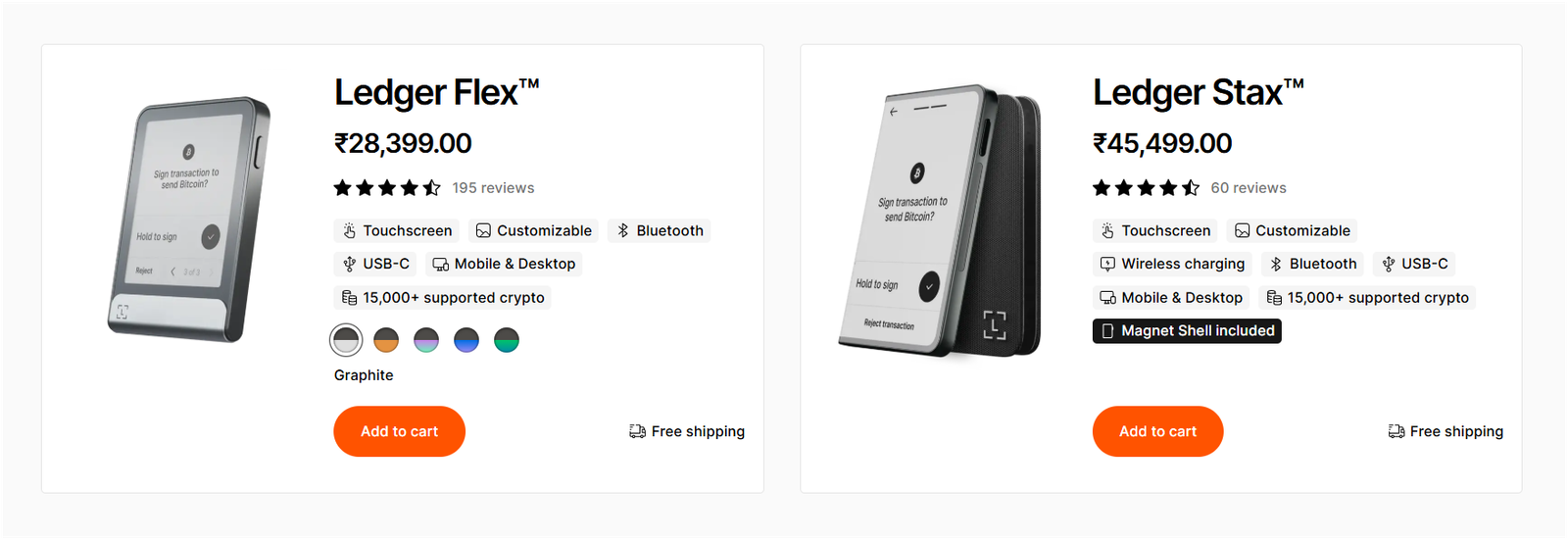
What You Get for $249 (Flex)
- A secure E‑Ink touchscreen that is large enough for most transactions.
- Bluetooth, NFC, and USB‑C connectivity.
- The same secure element chip (CC EAL6+) is found in Ledger Stax.
- 1.5 MB of memory (still limited but slightly more than Stax’s usable space).
- Basic magnets for attaching accessories.
What You Get for $399 (Stax)
- A curved 3.7‑inch display that wraps around the spine.
- Qi wireless charging and a magnetic case for stacking multiple devices.
- The same secure element chip and software.
- Less usable storage (about 1.1 MB), which is ironic.
- Heavier build and more premium materials.
- The ability to customize both the lock screen and the spine.
Breaking it down, I struggle to see $150 worth of extra value. Wireless charging and a larger screen are nice, but not essential.
The Stax does not offer more memory, more supported coins, or stronger security. The slower response time even makes it feel less premium when you actually use it.
That’s why I would say that the Stax is overpriced.
Ledger Flex vs Stax: Pros and Cons Summarized
To make it easier, here is a summary of what I liked and disliked about each Ledger wallet.
Who Should Choose the Flex
You’re likely best served by Ledger Flex if:
- You want a reasonably priced, secure wallet without paying for unnecessary extras.
- You manage fewer than ten coins and don’t need dozens of apps installed at once.
- You appreciate a device that fits in your pocket or wallet and doesn’t draw attention.
- You care about responsiveness and don’t want to tap a lagging screen.
- You like the idea of NFC passkey authentication for logging into websites.
I have also covered the Ledger Flex review in more detail, so you can read that as well.
Who Might Prefer the Stax
You might want to invest in the Ledger Stax if:
- You enjoy large displays. The bigger 3.7‑inch curved screen is easier on the eyes. People with vision issues or anyone who prefers more screen real estate will find the Stax appealing.
- You’re attracted to premium design and want a hardware wallet that looks like a high‑end gadget. The curved glass and magnetic stacking are conversation starters.
- You plan to own multiple Stax wallets. The stacking feature lets you store them neatly and label their spines.
- You appreciate wireless charging and hate cables cluttering your desk.
For more details, check out my Ledger Stax review.
Alternatives You Should Consider
- Ledger Nano X is cheaper, holds more apps thanks to 2 MB of memory, and uses a small screen with physical buttons.
- Trezor Safe 5 offers open‑source firmware and a colour touchscreen but lacks wireless connectivity.
- ELLIPAL Titan 2.0 is air‑gapped, uses QR codes for signing, and supports thousands of coins without app limits.
- NGRAVE Zero is a premium air‑gapped wallet with biometric authentication and top‑level security certification, though its price is similar to the Stax.
For more cryptocurrency wallets, check out my review of the best crypto hardware wallets…
Ledger Flex vs Ledger Stax: My Honest Verdict
After weeks of daily use, countless transactions, and plenty of time spent comparing specs and user feedback, my honest conclusion is clear.
Ledger Flex offers nearly everything that matters in a modern hardware wallet: secure storage, a decent touchscreen, Bluetooth and NFC connectivity, and integration with the Ledger ecosystem, all at a much better price. Its small size, faster response, and lower cost make it my preferred choice.
The Ledger Stax looks beautiful and introduces wireless charging and a larger curved screen. Those touches make it feel premium, but they don’t improve security or expand app storage.
The slow screen and high price are hard to ignore. For the extra $150, you could buy more crypto, invest in a secondary backup wallet, or even upgrade to an air‑gapped device with a colour display.
Now remember, both Flex and Stax suffer from limited memory, meaning active traders or those managing diverse portfolios will face the headache of uninstalling and reinstalling coin apps.
I genuinely hope Ledger addresses this flaw in future models. Until then, you have to decide what bothers you more, a smaller screen without wireless charging or a larger, slower screen with an inflated price tag. If you are looking to store XRP crypto, you can also check out my guide on the best hardware wallets for XRP.