
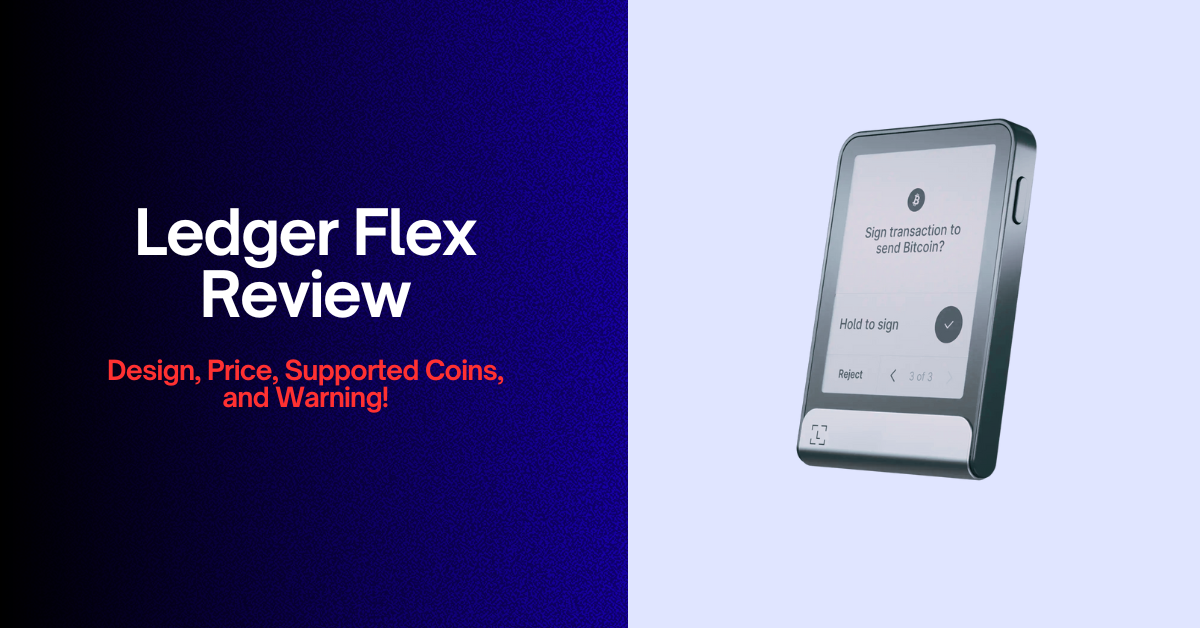
I’ve always been a bit obsessed with testing out new hardware wallets, especially anything that keeps my crypto safe. When Ledger announced the Flex last year, I felt skeptical. A cold crypto wallet with a full E‑Ink touchscreen, NFC, and Bluetooth support, and a built‑in recovery key.
A few months later, I finally got my hands on the new device. In this honest Ledger Flex review, I’ll tell you exactly what it was like to unbox, set up, and use the wallet.
I’ll go over the pros, the cons, and everything in between, and compare the Flex to other top crypto hardware wallets like Nano X, Stax, and even competitors like Trezor Safe 5 and ELLIPAL Titan 2.0.
Quick Snapshot of the Ledger Flex (2025 Specs)
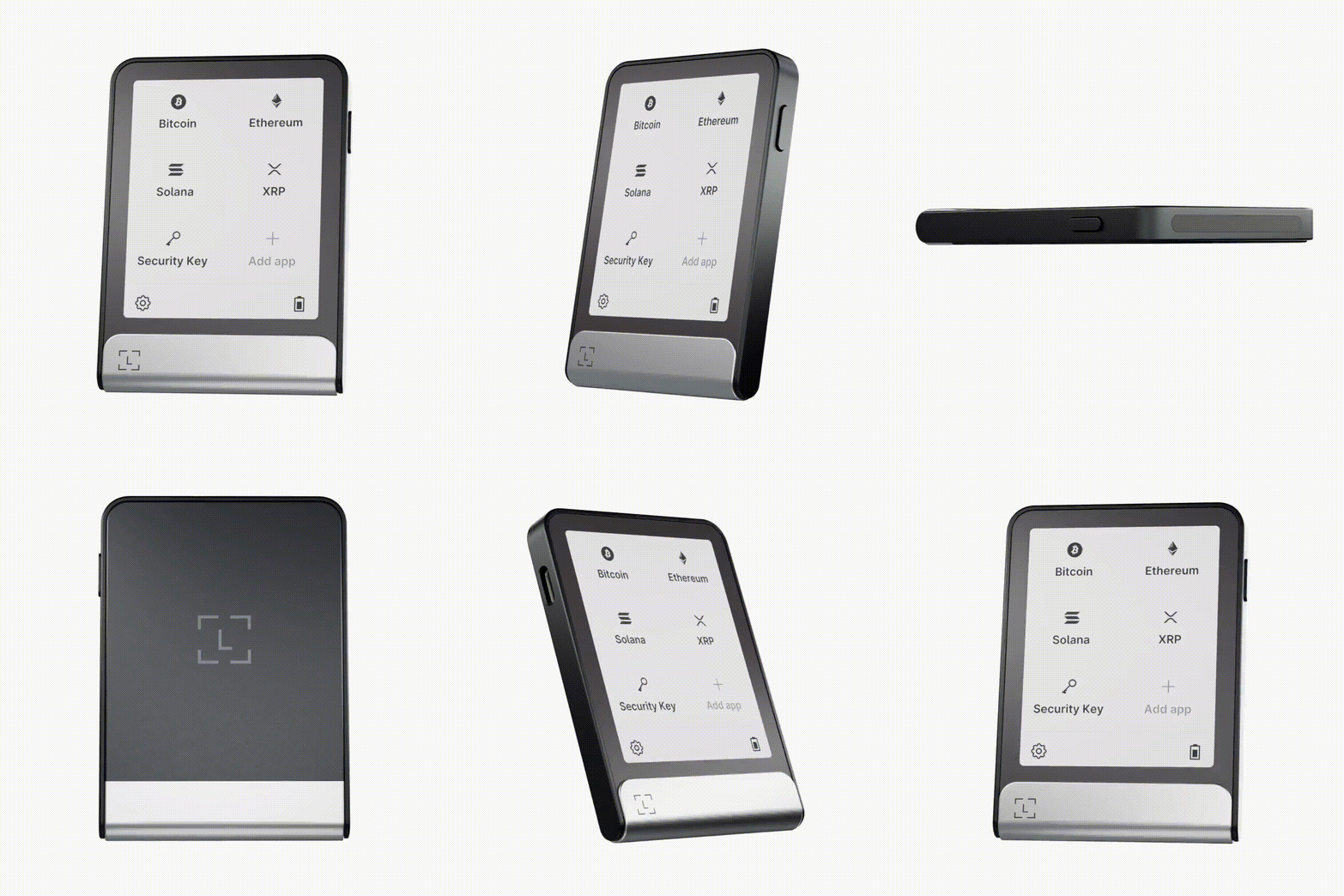
Before sharing my personal experiences, let me give you a quick review of the Ledger Flex’s core specifications.
| Features | Wallet Details | Notes |
|---|---|---|
| Release date | July 26, 2024 | Released during Ledger’s 10th anniversary |
| Price | ~$249 | Positioned between Nano X ($149) and Stax ($399) |
| Display | 2.84‑inch E‑Ink touchscreen with 16 shades of grey | Lock screen can display an NFT or an image |
| Weight | 57.5 g | Slightly heavier than Nano X (34 g) but still pocket‑friendly |
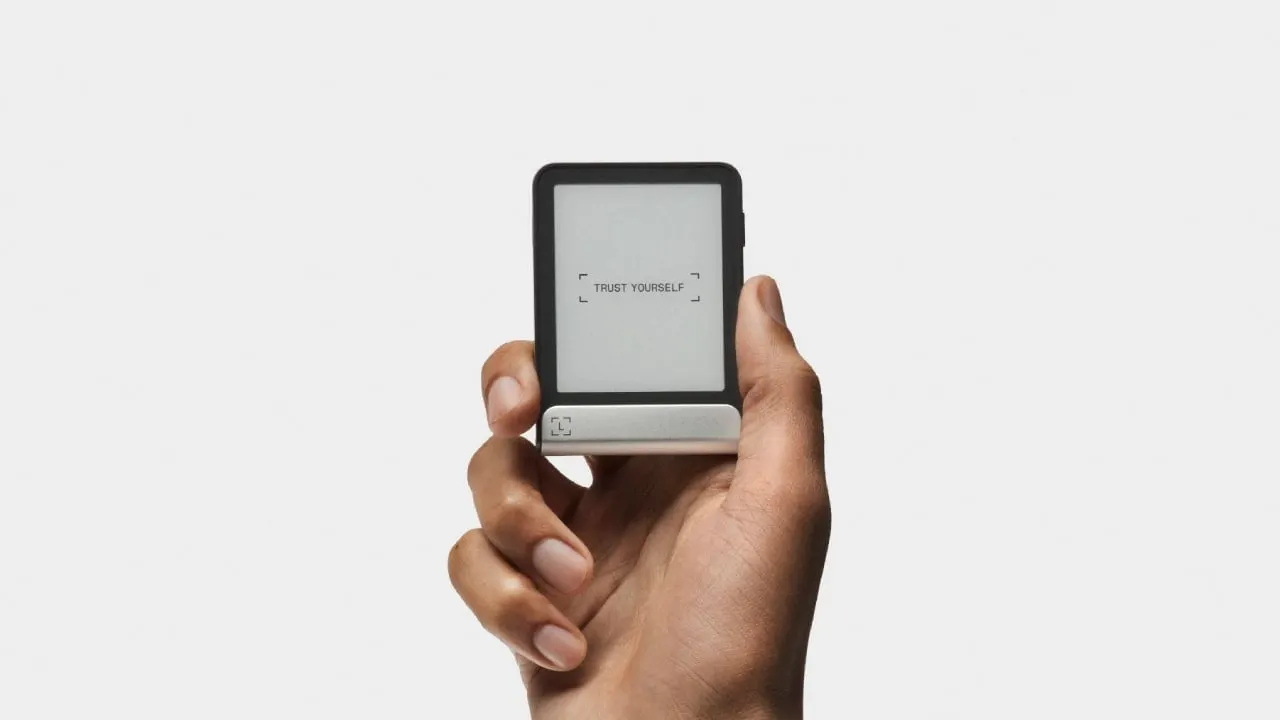
| Dimensions | ~78.4 × 56.5 × 7.7 mm | Credit‑card footprint, slightly thicker than Stax |
| Storage | 1.5 MB (up to 100 apps) | Limited memory means careful app management |
| Secure chip | ST33K1M5 with CC EAL6+ certification | Same security level as Ledger Stax |
| Battery | Up to ~10 hours of active use (about 150 transactions) | No wireless charging; requires USB‑C cable |
| Connectivity | USB‑C, Bluetooth 5.2, NFC | NFC allows contactless sign‑in and payments |
| Supported assets | 5,500+ coins and tokens, plus Ethereum & Polygon NFTs | Third‑party wallets expand support even further |
| Included accessories | USB‑C to USB‑C cable, recovery sheet, Free Ledger Recovery Key | Optional Magnetic Folio case sold separately |
Now, first, here is a quick overview of both negatives and positives about the Ledger Flex crypto wallet:
What I Don’t Like About the Flex
I spent several weeks reviewing Ledger Flex hardware wallet, and while impressed by many of its features, it isn’t perfect. Some aspects were frustrating enough that you should know them early on. Here’s what bothered me:
Limited Memory (Only 1.5 MB)
Ledger advertises that you can manage up to 100 apps at once on the Flex. In reality, you will rarely reach that number. Most cryptocurrency apps take up between 70 KB and 150 KB of memory. For larger coins like Bitcoin or Ethereum, the size sits at the higher end. Once you add support for multiple chains (especially if you hold altcoins), the 1.5 MB internal storage fills up quickly.
This limited space means you’ll spend time uninstalling and reinstalling apps. When you need to add new tokens or dApps, you have to remove existing ones temporarily.
Also, some users complained that the Flex is supposed to be a premium wallet, yet it still has less storage than the older Nano X (2 MB). Well, I find that criticism fair. For a $249 device, 1.5 MB feels stingy.
No Wireless Charging
The Flex has a built‑in battery with up to 10 hours of active use. That sounds great until you realize you can only charge it using the USB‑C cable included in the box, and if you travel often or leave your cable behind, you’re stuck. The top-tier models like the Ledger Stax provide Qi wireless charging.
It may not be a major drawback, but having to carry a cable for my premium wallet feels like a step backward.
E‑Ink Screen Isn’t Colorful
You’re gonna love the clarity of the 2.84‑inch E‑Ink display, but you will miss the vibrancy of a color screen. When viewing NFTs on the lock screen or browsing DeFi interfaces, everything appears in black and white.
Even the grayscale screen makes your NFTs look dull. While the grey levels are crisp and easy to read even in bright sunlight, it feels like a missed opportunity. For a device launched in 2024, I would expect at least limited color support.
Occasional Lag in Interface
Touchscreen input works well most of the time, but I did notice occasional delays. Swiping through menus or confirming transactions sometimes caused a half‑second lag. Well, software isn’t as polished as it could be.
Ledger has pushed out firmware updates, and performance improved slightly, but the delay is still noticeable compared to the snappy response of the Nano X physical buttons.
Price Feels High for the Features
At $249, the Flex sits squarely in the middle of Ledger’s product lineup. Yet some features, like the smaller 1.5 MB memory, lack of wireless charging, and black‑and‑white screen, feel budget‑tier.
I compare it to the older Nano X priced at $149, which has more memory (2 MB) and a vibrant OLED display. The Stax is $399, yes, but it offers a larger 3.7‑inch curved E‑Ink display and wireless charging.
While the Flex tries to find a middle ground, I often wondered, you are paying a premium for a flashy screen and NFC support rather than truly game‑changing hardware.
App Ecosystem Still Growing
Ledger Live supports over 5,500 coins and tokens, yet the app ecosystem outside of native support is still playing catch‑up. For example, some popular third‑party DeFi protocols only support the Flex through Web3 browser extensions.
The good news is that Ledger regularly adds support, but I felt that certain dApps I use daily didn’t offer a fully optimized experience for Flex at launch. In fairness, the same issue exists on many competing hardware wallets like ELLIPAL Titan 2.0 and Trezor Safe 5.
According to me, Keystone 3 Pro is good at supporting third-party software wallets.
No Native Balance Display
You cannot view your portfolio balances directly on the Flex’s screen. The E‑Ink display only shows menus, transaction details, and your chosen lock screen picture.
You’ll need to connect to the Ledger Live app on your smartphone or computer to see your holdings and their current values. Some might appreciate this minimalism for security reasons, but I found it inconvenient.
But again, no hardware wallet shows your crypto balance, because they are offline. Hence, let’s just hope we get this feature someday.
What I Like About the Ledger Flex Wallet
Despite my complaints, I genuinely enjoyed many features during my Ledger Flex review. Some aspects of the device are genuinely innovative and solve problems that have annoyed me with previous hardware wallets.
In Summary: Why I Like the Flex
- Large, readable E‑Ink touchscreen with intuitive touch controls.
- Strong security thanks to the ST33K1M5 chip and CC EAL6+ certification.
- Multiple connectivity options (USB‑C, Bluetooth 5.2, NFC) and a free recovery key.
- Clear Signing for transparent transactions and Protection Mode for automatic locking.
- Long battery life and minimal standby drain.
- Support for thousands of cryptocurrencies and built‑in staking.
Touchscreen and User Experience
The Ledger Flex has a 2.84‑inch E‑Ink touchscreen. Compared to the tiny OLED screen on the Nano X, this display feels like upgrading from a flip phone to a Kindle. Reading addresses, fees, and smart contract details is easy and comfortable.
You can swipe and tap like on a smartphone, and there’s even haptic feedback. Hence, this makes entering your PIN or approving transactions much more intuitive. The large display also supports a customizable lock screen where you can show your favorite NFT or image, even when the device is powered off.
The user interface is minimalist but efficient, and the menu shows your installed apps, connectivity options, and settings. Because the screen uses E‑Ink technology, it’s legible in direct sunlight and doesn’t strain your eyes.
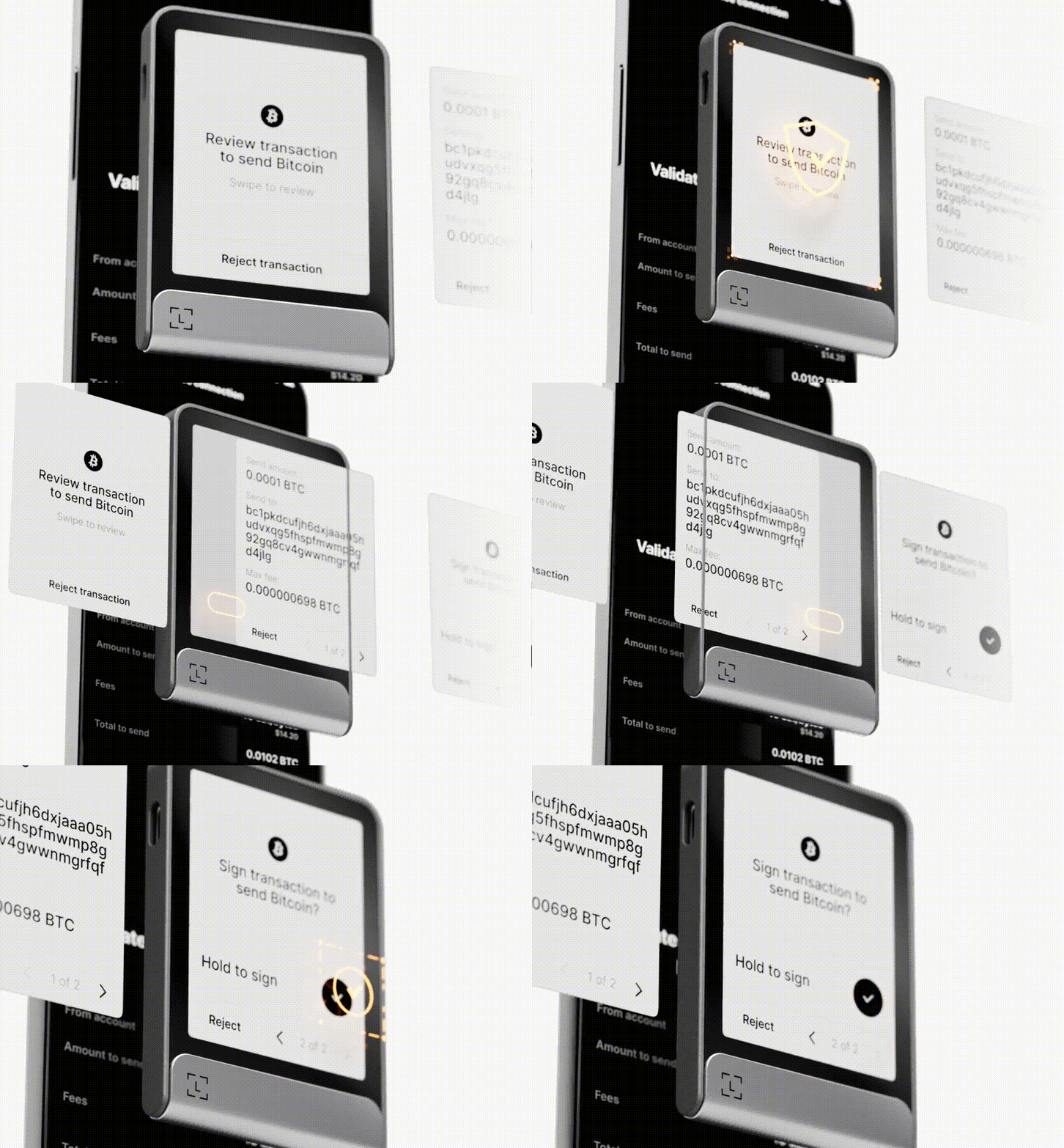
Also, I particularly enjoyed the “Clear Signing” feature; every transaction is displayed in human‑readable format. You will easily see the smart contract name, token amount, gas fee, recipient address, and network. Obviously, this alone could save new users from painful mistakes.
Strong Security Backbone
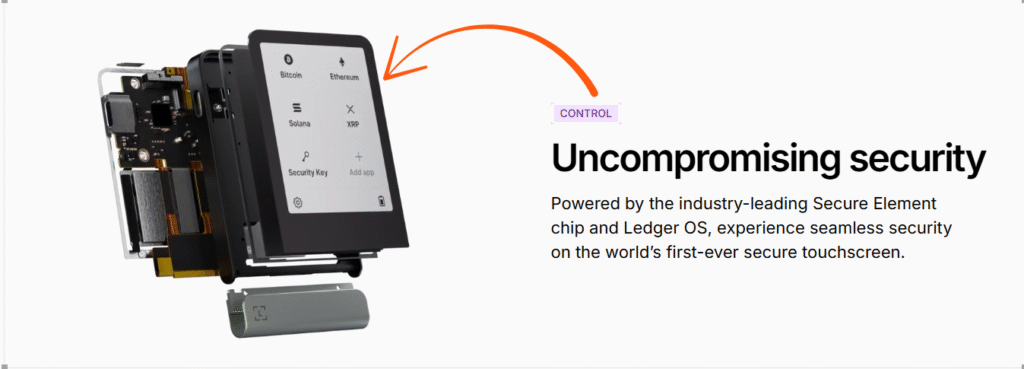
All Ledger wallets isolate your private keys inside a tamper‑resistant Secure Element chip, and the Flex is no exception. The chip used here is ST33K1M5 with CC EAL6+ certification, and it is similar to chips found in banking hardware and military equipment.
That certification level means the device underwent rigorous testing to resist physical and side‑channel attacks. As long as you keep your 24‑word recovery phrase safe and set a strong PIN, your keys never leave the device.
On top of that, I love the added features:
- Protection Mode automatically locks the device if it detects suspicious activity.
- Two‑factor authentication and multi‑signature support are available for extra protection.
- Custom-built BOLOS operating system
- The included Ledger Recovery Key is an NFC card protected by its own Secure Element and PIN. It acts as a hardware backup for your seed phrase, so you can recover your wallet without revealing your seed to anyone else. That backup stays offline and in your possession.
Battery Life: It Actually Lasts
The 10‑hour battery life advertised by Ledger isn’t just marketing fluff. In my tests, I managed around 9 hours of active use while making multiple transactions, staking tokens, and exploring dApps.
I even left the device in standby for two weeks, and it still had charge left. The E‑Ink display consumes almost no power when showing static content, so the battery lasts longer than you’d expect.
- Charging Speed: I charged the device from 20% to 100% using a 20 W USB‑C charger in about 75 minutes. The battery itself is small (200 mAh), so quick top‑ups are possible. Unfortunately, as I complained earlier, there is no wireless charging. If you forget your cable, you cannot charge the device.
- Battery Replacement: The battery is not user‑replaceable, but Ledger estimates that it should last several years. E‑Ink screens use little power, so the battery should retain capacity longer than typical smartphone batteries. When the battery eventually dies, you can still connect the Flex via USB‑C and use it while plugged in. That’s a relief, but I’d still prefer a battery replacement option. After all, cold wallets should last a decade or more.
NFC Support and Multi‑Device Connectivity
NFC is best for daily crypto users. With the Flex, I can tap the device against my smartphone to authenticate logins or sign transactions. It feels like using Apple Pay or Google Pay, but for crypto.
This is especially convenient when logging into exchanges, DeFi apps, or even social media platforms that support hardware security keys. Ledger’s Security Key feature works with major websites like Google, X (Twitter), and Binance. I use my Flex to log into my accounts instead of SMS or app‑based 2FA, and it’s far more secure.
Next, Bluetooth 5.2 connectivity is stable and fast. I paired the Flex with my Android phone, Windows laptop, and an iPad without any issues, and also, transactions via Bluetooth felt almost instantaneous.
The option to use USB‑C is there for people who are wary of Bluetooth (and you can always turn Bluetooth off entirely for extra security). Having both options means you can travel with just the device and your phone, or plug it into your desktop when doing larger portfolio management.
Customizable NFT Lock Screen and Attractive Design
On the aesthetic front, the Flex looks sleek. It comes in multiple colors: Graphite (black/grey), BTC Orange, and new hues like Solana Edition and Neptune Blue. I chose the classic graphite model, and it looks understated but premium.
The aluminum frame, combined with a plastic back, keeps it durable yet lightweight, and the credit‑card size means it fits in a wallet or pocket easily. The optional Magnetic Folio case adds protection and can hold additional recovery keys.
The lock screen can display any image or NFT you upload through Ledger Live. Even when it’s off, the chosen image stays visible because E‑Ink displays maintain images without power. It’s a fun personal touch.

Broad Crypto Asset Support and Staking
Ledger Live’s claim of 5,500+ supported coins and tokens is not exaggerated. Major cryptocurrencies like Bitcoin, Ethereum, Solana, Cardano, XRP, and thousands of ERC‑20 tokens are natively supported. And, for less common assets, you can connect third‑party wallets like MetaMask, Rabby, or Keplr and still use the Flex for signing.
Flex also supports NFTs on Ethereum and Polygon, allowing you to view and transfer them directly through Ledger Live.
Ledger Flex also supports crypto staking with good APYs. Through the Ledger Live mobile app, you can stake ETH, ADA, DOT, ATOM, SOL, TRX, and other tokens.
Clear Signing and Human‑Readable Transactions
One of the features I can’t stop praising is Clear Signing. Old hardware wallets often present DeFi interactions as long strings of hex code, making it easy to sign the wrong transaction by mistake.
Now, with Clear Signing, the Flex shows you the actual function name (e.g., “swap ETH for USDC on Uniswap”), the exact token amounts, the contract address, and even the gas fee. You just have to scroll through the details and only sign once you’re sure.
Free Ledger Recovery Key Included
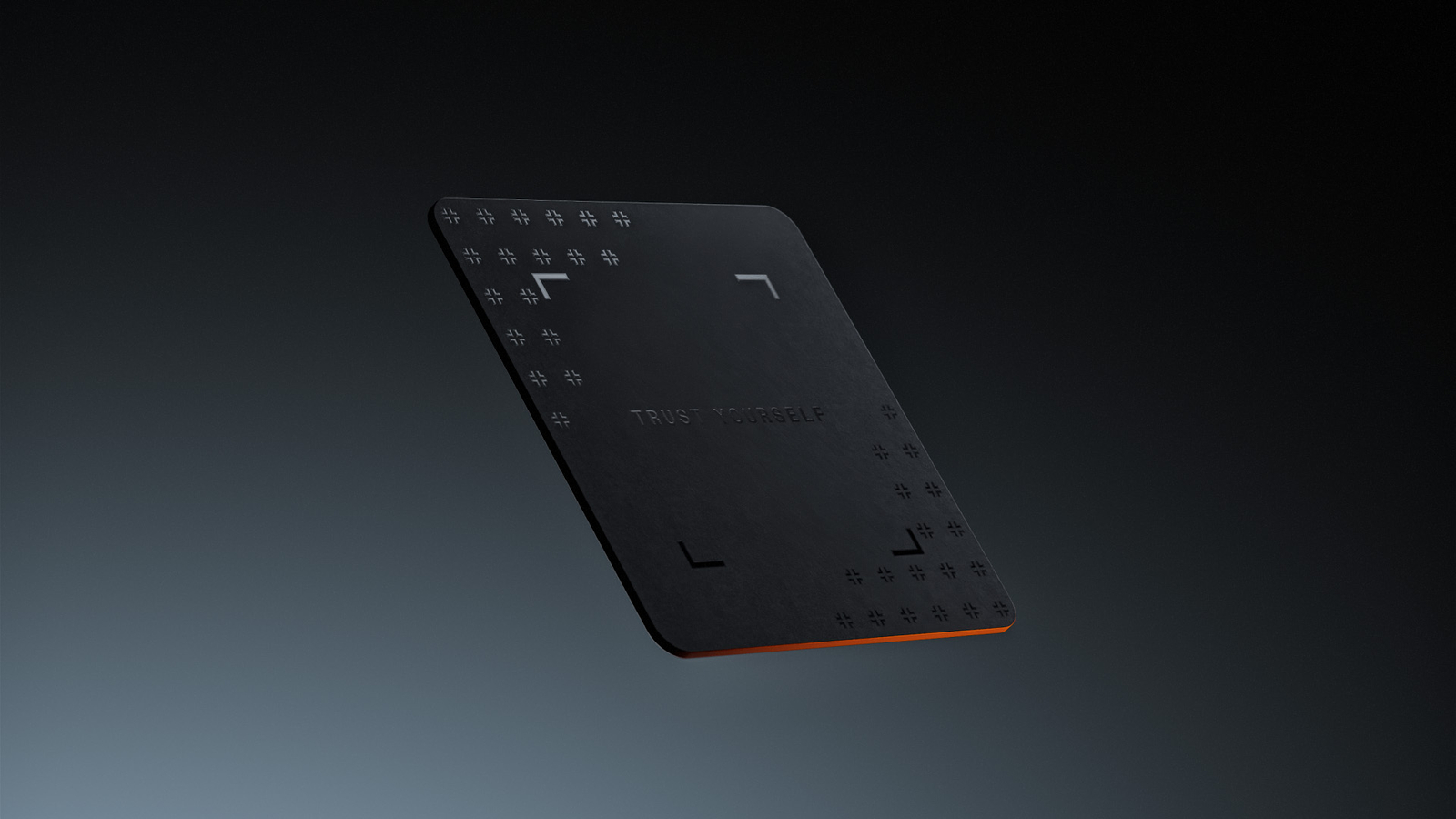
Earlier, I mentioned concerns about the optional “Ledger Recover” service, but I love that the Ledger Recovery Key, a physical NFC card, comes free with the Flex.
You set a separate PIN on the recovery key, then pair it with your Flex via NFC. Now, if the wallet is lost or damaged, you can tap the card to regain access. No subscription is required for this backup; it’s included in the box. You need to keep it in a separate safe place, far from your main Ledger wallet.
Unboxing and Setup: My Step‑by‑Step Experience
Inside the Box
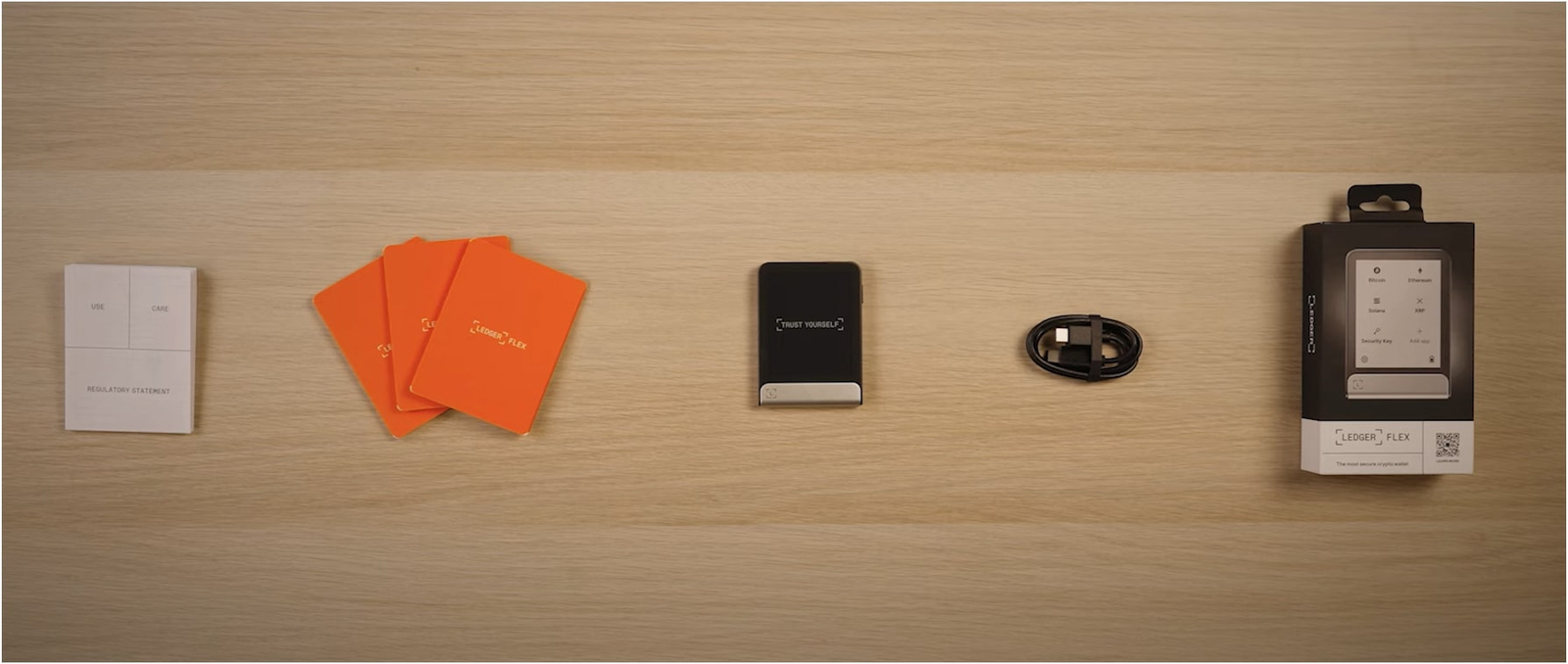
Ledger keeps the packaging simple yet secure. So, when you slid open the Flex box, a tamper‑evident seal reassured that the device hadn’t been opened or swapped. Here’s exactly what you will find inside:
- Ledger Flex device wrapped in protective film.
- USB‑C to USB‑C cable (fairly short at about 50 cm). You can use any standard cable if you need a longer one.
- Paper recovery sheet for writing down the 24‑word seed phrase.
- Ledger Recovery Key (NFC card) sealed in its own envelope.
- Quick start guide and stickers. The stickers are nice, but they went straight into my desk drawer.
I like that the box doesn’t include unnecessary accessories. The Magnetic Folio case and extra recovery keys are optional add‑ons costing around $29–39 each, but you don’t need them to get started.
Performing the Genuine Check
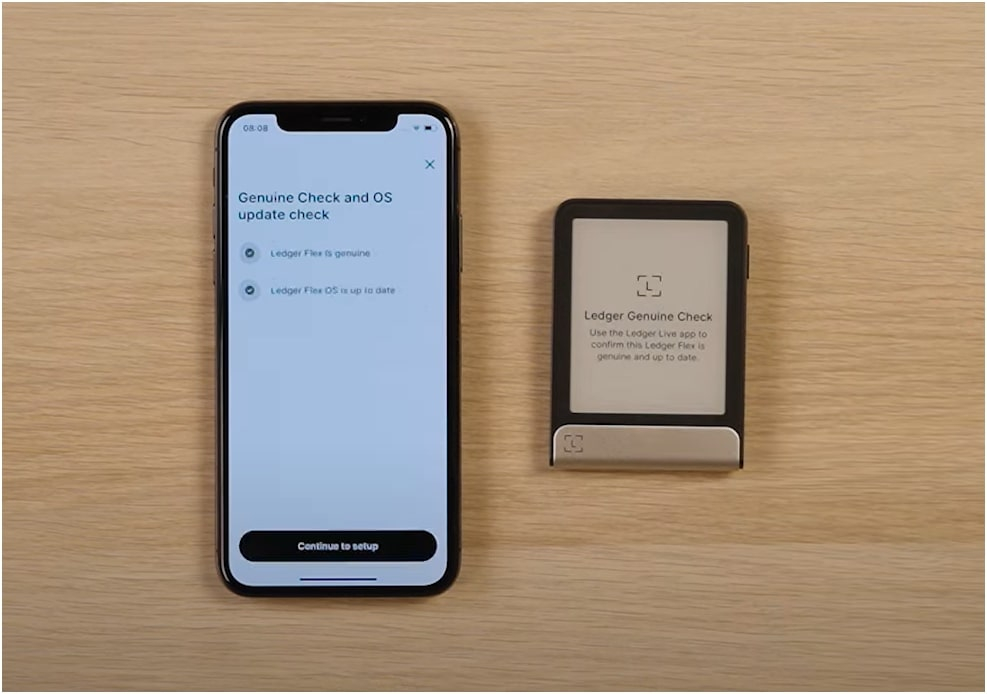
Before anything else, I wanted to make sure the device was authentic. Ledger Live guides you through a genuine check.
You need to plug the Flex into your computer or turn on Bluetooth, open Ledger Live, and follow the instructions. The app checks the device’s hardware signature to make sure it hasn’t been tampered with. The process takes less than a minute. Only after that check can you proceed.
Charging and Powering On
Once I confirmed authenticity, I charged the device. It arrived with about 60% battery. I recommend you charge it to at least 80% before setup. You can do this by connecting the USB‑C cable to a computer or power adapter.
While you wait, download Ledger Live on your PC or smartphone (available for Windows, macOS, Linux, Android, and iOS). The app is free and acts as the dashboard for all your Ledger devices.
After charging for 45 minutes, hold the power button on the top edge for two seconds. The E‑Ink display lit up with a “Hello” screen. It will prompt you to choose your language, then ask whether you want to set up a new device or restore from a recovery phrase. Since my Flex was new, I chose Set Up as New Device.
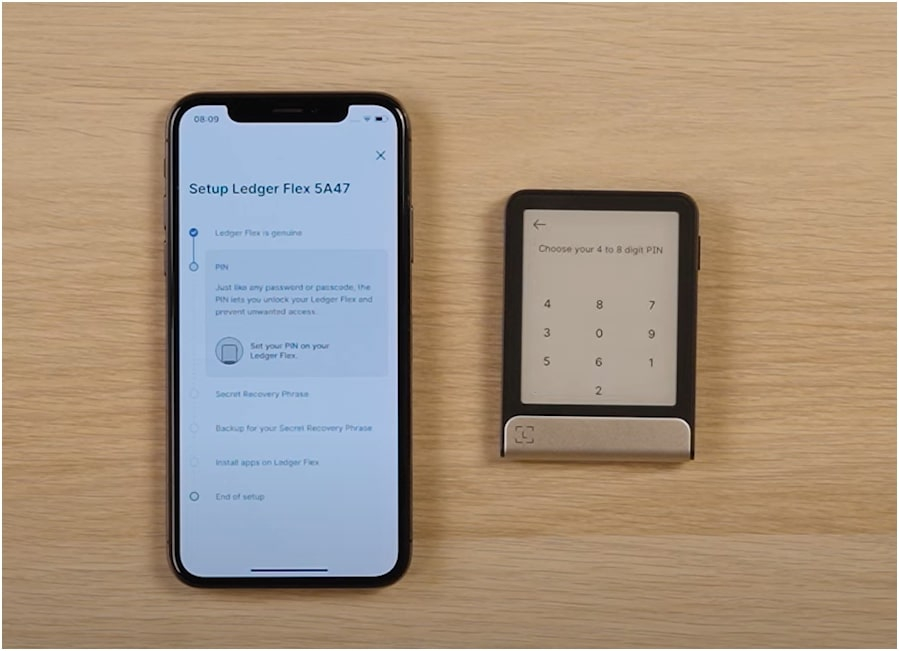
Creating a PIN
The next step is to set a PIN. You can pick any 4–8 digit code. I strongly recommend choosing at least six digits.
The device uses a random numeric keypad each time, so the numbers appear in different positions, making it harder for someone to guess your PIN by watching your finger movements. Enter the PIN twice to confirm. The tactile feedback on the E‑Ink screen made this step easy.
Writing Down the 24‑Word Recovery Phrase
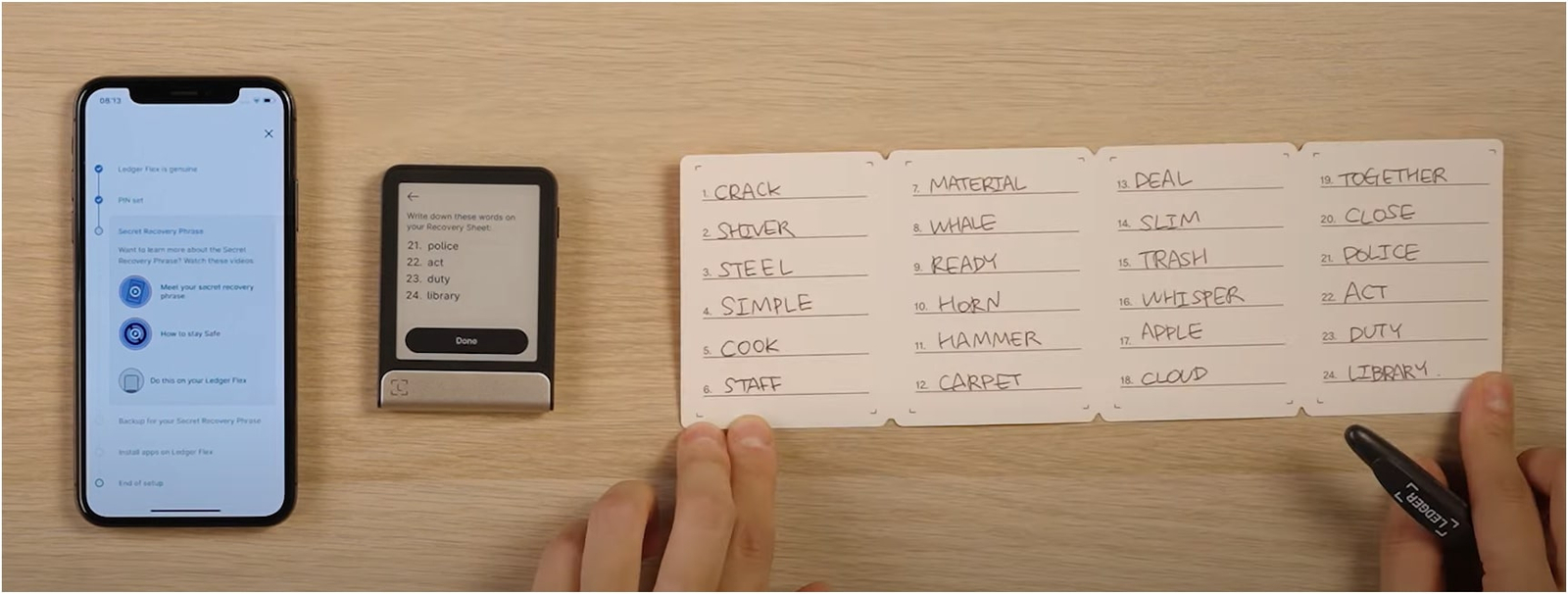
Now comes the most important part: writing down your 24‑word seed phrase. The Flex displays each word one at a time. You must write them down in the exact order on the included recovery sheet.
So, take your time, double‑check every word, and make sure no one is watching. Once the device finishes showing all 24 words, it asks you to confirm the words. You need to select the correct words using the touchscreen. This step ensures you copied the phrase correctly.
Installing Apps
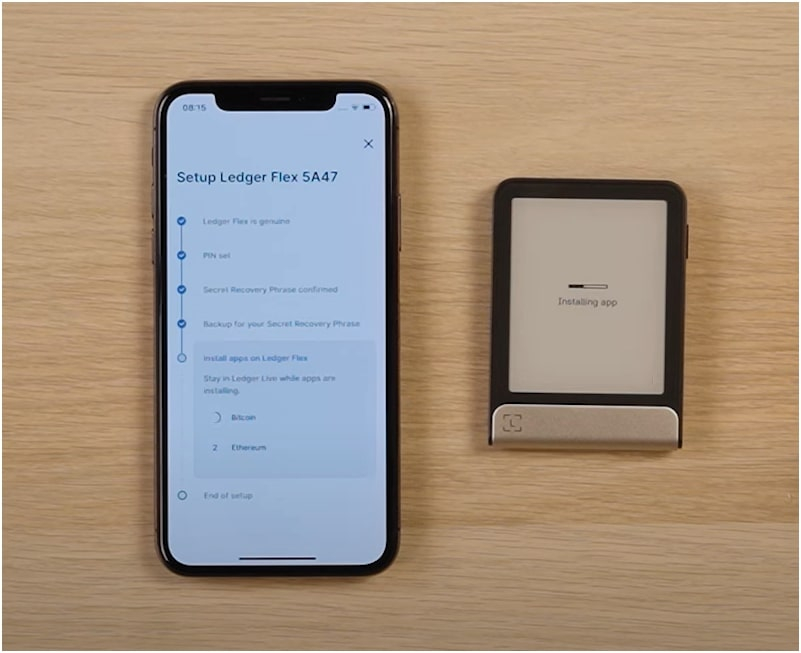
Now, you need to proceed to install apps for the cryptocurrencies you planned to use. Ledger Live lists thousands of supported assets. To add an app:
- Open the Ledger Live app on your phone or computer.
- Navigate to “My Ledger” (desktop) or “Discover” (mobile).
- Find the coin or token you want (e.g., Bitcoin, Ethereum, Solana) and click Install.
- The installation happens over USB‑C or Bluetooth. The device prompts you to confirm the installation on its touchscreen.
The app size varies, but even big coins like Bitcoin or Ethereum install in about 15–20 seconds. Once installed, the icon appears in the Flex’s menu. You can then add accounts for that crypto through Ledger Live. Here, accounts only show your balance and transaction history, but the keys stay on the device.
Token Swapping and DEX Use
Ledger Live includes a built‑in swap feature for a limited set of tokens. You can swap directly between BTC, ETH, USDC, USDT, and a few other assets using partners like Changelly or Wyre. Fees vary but are usually competitive.
For more complex DeFi swaps, you need to connect the Flex to Uniswap through MetaMask. The device makes it nearly impossible to sign the wrong transaction because Clear Signing shows you exactly what you’re trading and for how much.
You can also read my list of the best cold storage wallets…
Let’s Review Ledger Stax’s Design and Build Quality
A Premium Look and Feel
I mentioned earlier that the Flex looks more like a smartphone accessory than a typical hardware wallet. The aluminum frame provides rigidity and a premium feel, while the plastic back keeps the weight down.
The device’s dimensions (~78.4 × 56.5 × 7.7 mm) make it slightly larger than a credit card but thin enough to slip into a wallet or pocket.
Buttons and Ports
There is just one physical button on the Flex: the power/lock button at the top. All other interactions happen on the touchscreen. The left side houses a USB‑C port for charging and a wired connection.
The absence of side buttons keeps the design clean and minimalistic. The back is smooth, and the edges are slightly rounded, so the device feels comfortable in the hand.
Durability and Scratch Resistance
The display is covered with chemically strengthened Gorilla Glass and an anti‑glare coating. I kept my Flex in my pocket with keys and coins for a few days and didn’t notice any scratches.
The E‑Ink screen isn’t prone to fingerprints, unlike glossy OLEDs. Because the back is plastic, it might show scuffs over time, but the optional Magnetic Folio case can protect it. The case attaches magnetically to the back and folds over the front. It adds bulk but helps keep the device scratch‑free.
Everything About Ledger Live App (Mobile + Desktop)
You cannot use the Flex without the Ledger Live app, as it acts as your portfolio dashboard, app store, and transaction manager. It connects to your device via Bluetooth or USB‑C.
I appreciate that the desktop app is available on all major operating systems (Windows 10/11, macOS Big Sur+, Ubuntu 20.04+) and that the mobile app supports both iOS and Android.
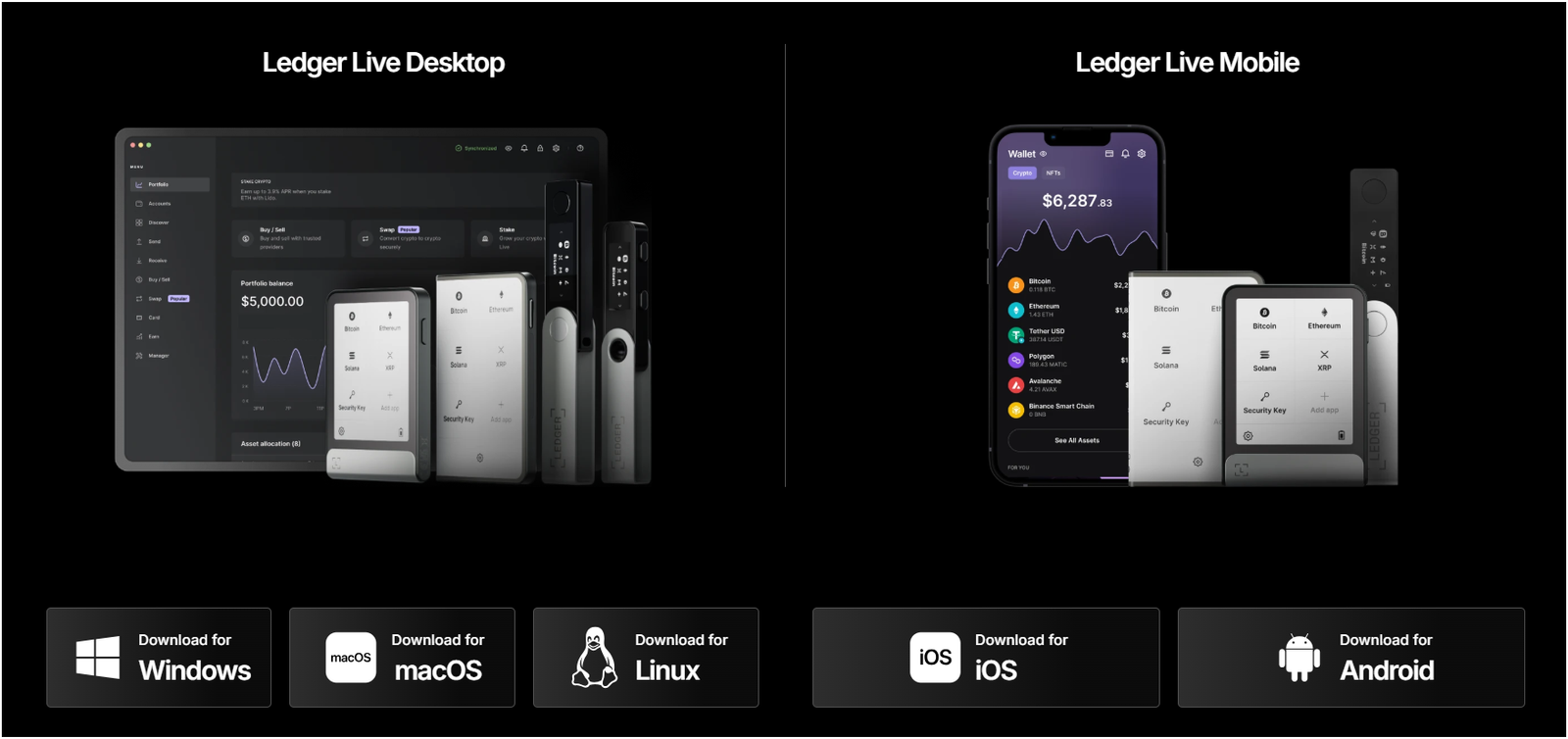
Ledger Live is polished: it shows your total portfolio value, individual asset balances, price charts, and historical performance. You can also buy, sell, swap, and stake directly from the app. The app store within Ledger Live lists thousands of supported coins. And, when you install an app, the software calculates how much storage space it will consume and shows you how much space remains.
If you run out of space, you can uninstall apps temporarily; uninstalling does not remove your coins or addresses, just the ability to manage that coin until you reinstall the app.
Some people find this concept confusing at first. Also, I saw some of you panic after deleting the Bitcoin app, thinking you lost your funds. Rest assured, your coins remain on the blockchain, and the device still holds the keys. You just need to reinstall the app to interact with them.
Staking is built into Ledger Live for several chains. You can stake the following coins directly:
- Ethereum (ETH) via Lido or Stader (liquid staking tokens like stETH or ETHx)
- Cardano (ADA) with community validators (earning around 3–5% annual yield)
- Polkadot (DOT) and Kusama (KSM) use nominated proof‑of‑stake
- Cosmos (ATOM) and other Cosmos‑SDK chains
- Solana (SOL) via Marinade or other validators
- Tezos (XTZ)
- Tron (TRX)
Just a heads up! If you are looking for other wallets, check out my guide on the best crypto hardware wallets…
Is Ledger Flex Safe to Use? Security Features Reviewed
Yes, Ledger Flex is really safe to use for all your crypto needs. Today, it is the most trusted crypto hardware wallet with over 10 million users.
Secure Element and CC EAL6+ Certification
I touched on this earlier, but it deserves more attention. The Secure Element chip used in the Flex (ST33K1M5) has CC EAL6+ certification.
The chip protects the private keys by isolating them from the main microcontroller, and even if someone installs malicious software on your computer or phone, the keys never leave the Secure Element, and they cannot be extracted even with physical access.
Protection Mode and Brute‑Force Mitigation
Protection Mode is a new feature that automatically locks the device if it senses suspicious behaviour (e.g., repeated failed PIN attempts or unusual commands).
So, if someone steals your wallet and tries to brute‑force the PIN, the Flex will wipe itself after 3 incorrect entries. That may sound scary, but remember you have your 24‑word recovery phrase and the Ledger Recovery Key to restore your funds.
Secure Boot and Firmware Updates
The firmware is signed and verified by Ledger’s secure boot process. You cannot flash unauthorized firmware onto the device, and firmware updates are delivered through Ledger Live, and you must physically confirm the update on the device.
While I love the secure architecture, some people question the closed‑source nature of Ledger’s firmware. Rival products like Trezor provide fully open‑source firmware.
Ledger says that releasing source code could expose vulnerabilities, but the closed approach means you have to trust the company. It’s a trade‑off between transparency and security by obscurity.
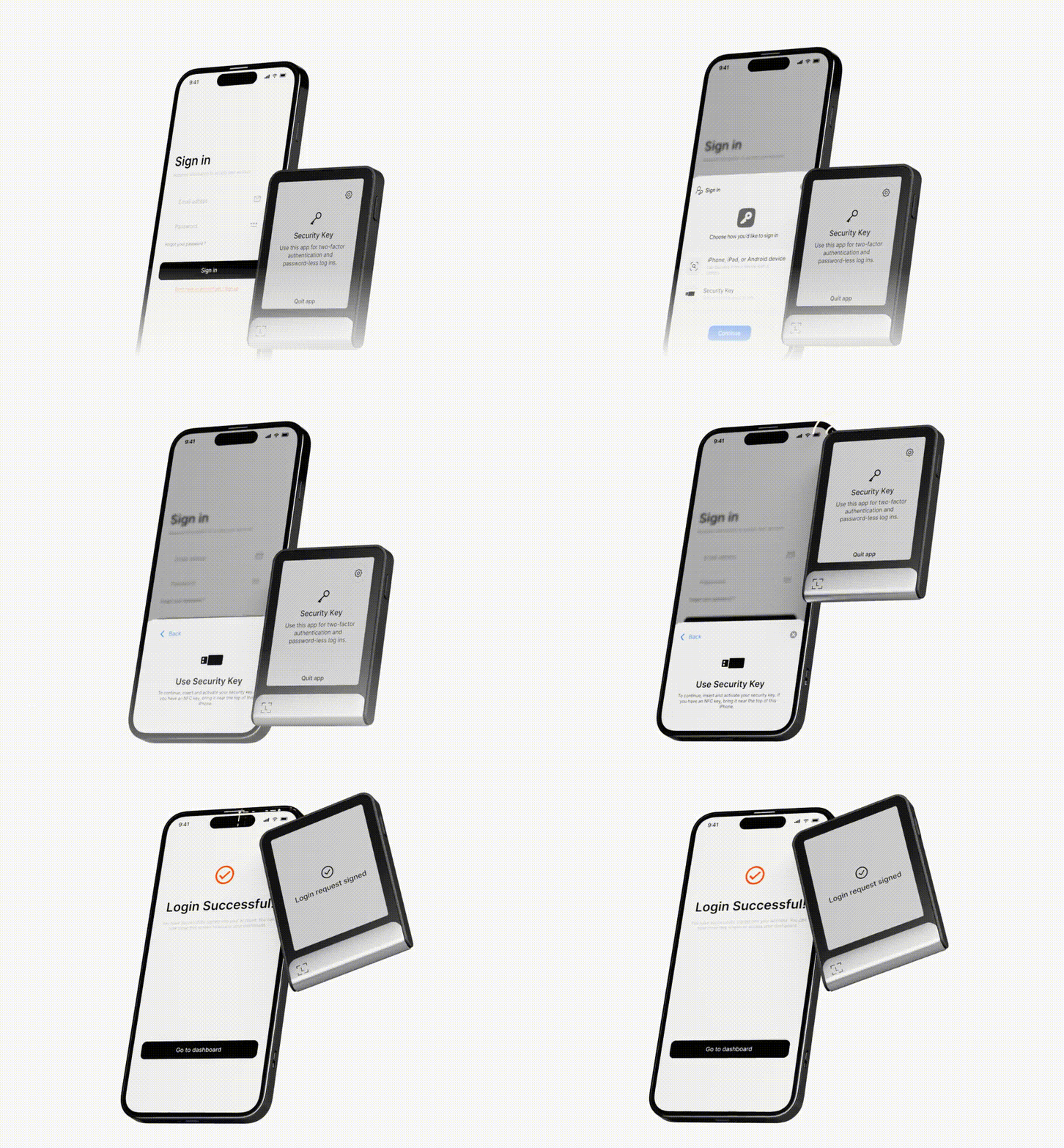
Secure Login (FIDO U2F / WebAuthn)
Using the Flex as a security key for online accounts is one of my favorite features. It turns your crypto wallet into a universal 2FA device, and you can register your Flex with Gmail, Twitter (X), and even crypto exchanges like Binance and Coinbase.
Now, when you log in, you just need to tap the Flex against your phone (using NFC) or plug it in via USB and confirm. It’s more secure than SMS codes or authenticator apps because the device performs cryptographic operations internally.
Even if someone steals your phone number or hacks your Google Authenticator, they can’t access your account without Flex.
Comparing Ledger Flex to Other Wallets
The top alternatives to Ledger Flex are Ledger Nano X, Ledger Stax, Trezor Safe 5, and ELLIPAL Titan 2.0. Here is a quick comparison:
| Feature | Ledger Flex | Ledger Nano X | Ledger Stax | Trezor Safe 5 | ELLIPAL Titan 2.0 |
|---|---|---|---|---|---|
| Display | E-Ink Touch | OLED | Curved E-Ink | Color Touch | LCD Touch |
| Battery | 10 hrs | 8 hrs | Few days | No Recharge | Dual Battery |
| Connectivity | USB-C, BT 5.2, NFC | USB-C, Bluetooth | USB-C, Bluetooth | USB-C only | USB, QR |
| Secure Element | EAL6+ | EAL5+ | EAL6+ | EAL6+ | EAL 5+ (Air-Gapped) |
| Multi-Coin Support | 5,500+ | 5,500+ | 5,500+ | 9,000+ | 10,000+ |
| Mobile Support | Android, iOS (via BT) | Android, iOS | Android, iOS | Android only | Android, iOS (QR) |
| Price | $249 | $149 | $399 | $169 | $149 |
| Recovery Option | On-device | Manual | On-device | Shamir | SD card backup |
I have also covered an in-depth Ledger Nano X review and Ledger Stax review. So, you can read these reviews as well…
Real User Feedback: What Others Are Saying
I went through multiple Reddit threads and Quora answers to see how other people feel about the Flex.
Positive Reviews on Ledger Stax
- Ease of Use: Many users said it’s the easiest Ledger device they’ve used. The touchscreen is intuitive, and the menus are self‑explanatory. One Redditor said, “I got my parents to set up a Flex, and they understood it without any help.”
- Clear Signing: DeFi enthusiasts love being able to read transaction details in plain English. A Uniswap trader commented that Clear Signing saved him from approving a malicious transaction because he saw the mismatch on the Flex.
- NFC Login: People who use hardware wallets for two‑factor authentication appreciate the convenience of tapping the device to log into Google, X, or Binance. It reduces the number of devices they carry.
- Long Battery Life: Several reviews praise the device for lasting weeks between charges. They like not having to worry about constant charging cables.
- Recovery Key Included: Users feel more secure knowing there’s a physical backup that doesn’t require a subscription. Some said they store the Recovery Key in a separate bank safe deposit box.
Common Complaints About Flex
- Price vs. Storage: The biggest gripe is paying $249 for a device with only 1.5 MB of storage. Many feel that Ledger could have doubled the memory for such a premium product. As one user put it, “I’m tired of uninstalling apps just to add a new token.”
- Screen Ghosting and Refresh Rate: Although E‑Ink is crisp, some users notice ghosting when moving quickly between screens. It’s not a huge problem, but it makes the device feel less modern.
- Software Bugs: Early firmware versions had issues with Bluetooth pairing and app crashes. Ledger has fixed many of these bugs, but new users still run into occasional freezes. Restarting the device usually solves the issue.
- No Wireless Charging: Users who own the Stax or other premium gadgets expected Qi wireless charging here. Some plan to wait for the Flex 2.0 if it adds that feature.
- Closed Source Concerns: In privacy‑focused communities, the closed‑source nature of Ledger firmware is a recurring complaint. People worry about backdoors or undisclosed vulnerabilities. Ledger counters that closed firmware protects against reverse engineering, but the debate continues.
- Ledger Recover Controversy: Even though the Recover service is optional, its existence makes some people uncomfortable. They worry that regulatory pressure could force Ledger to hand over shards of seed phrases. I agree that trusting third parties with any part of your recovery phrase is risky, and it’s one reason I don’t use Recover.
Who Should Buy the Ledger Flex?
The decision to buy a hardware wallet should be based on your experience level, portfolio size, and personal preferences. Here’s my take on who will benefit the most from the Flex:
Great Fit For
- New Crypto Users: If this is your first hardware wallet, the Flex’s intuitive touchscreen and simple setup make it a gentle entry point. You won’t fumble with buttons or small displays.
- DeFi Enthusiasts: If you regularly trade on Uniswap, PancakeSwap, Curve, or other protocols, the Clear Signing feature provides peace of mind. No more guessing what you’re signing.
- NFT Collectors: The lock screen lets you display your favorite NFTs, and the device supports Ethereum and Polygon NFTs directly. You get the security of cold storage without losing NFT visibility.
- Web2 and Web3 Integrators: People who want a single device for crypto and account authentication will love the NFC login features. Logging into Google and Binance with a tap is convenient.
- Anyone Who Travels Frequently: The long battery life and multiple connectivity options make the Flex reliable on the go. You can manage crypto from a café or airport lounge via Bluetooth, and you can charge quickly via USB‑C.
Might Want to Consider Alternatives
- Large Portfolio Holders with Many Tokens: If you juggle dozens of tokens across various chains, the 1.5 MB storage may frustrate you. Consider the Nano X (2 MB) or Trezor (unlimited tokens per firmware) if you need more capacity.
- Open Source Advocates: If transparency matters more than CC EAL certification, Trezor or other open‑source wallets might suit you better.
- Price‑Sensitive Users: If $249 is out of your budget, the Nano S Plus ($79) or Nano X ($149) provide similar security without the fancy screen.
- Wireless Charging Fans: If you want Qi charging, go for the Stax or wait for a future Flex update.
- Hardcore Privacy Purists: If the mere existence of Ledger Recover makes you uneasy, or if you distrust closed firmware, you may prefer fully air‑gapped solutions like ELLIPAL or Keystone. Those devices don’t connect via Bluetooth or USB and rely on QR codes only.
Final Verdict: Is It Really Good?
After spending weeks with the Ledger Flex review, my honest conclusion is that it is really good, but not perfect. The device introduces meaningful improvements over older wallets: a big, readable touchscreen, intuitive navigation, NFC login, strong security certification, Clear Signing, and long battery life. I genuinely love the human‑readable transaction signing; it’s saved me from potential mistakes and boosted my confidence in DeFi.
That said, I can’t ignore the downsides. 1.5 MB storage is a major limitation for a $249 device. The lack of wireless charging and the monochrome E‑Ink screen will disappoint users who expect a premium feel.
Some will be uncomfortable with the closed‑source firmware. Others will be put off by occasional bugs and the need to manage app space.
For me personally, the Ledger Flex has earned a place in my everyday crypto toolkit. I keep it next to my phone, use it for both DeFi trades and secure logins, and enjoy the peace of mind that comes from seeing exactly what I’m signing.
It’s an exciting glimpse into what the future of self‑custody hardware could look like, and I look forward to seeing how Ledger continues to refine it.
People Also Ask (FAQs)
Can I use the Ledger Flex without an internet connection?
Yes. Your private keys remain offline at all times. You only need an internet connection through your phone or computer to broadcast transactions. The device itself does not connect to Wi‑Fi, only to your host device via USB‑C or Bluetooth. NFC is used for signing or logging in.
Does the Flex support all ERC‑20 tokens?
Yes, Ledger Flex supports most major ERC‑20 tokens through Ledger Live. For tokens not listed, you can use MetaMask or other EVM wallets. The Flex acts as a signer through the Ethereum app.
Is the Flex safe if Ledger goes out of business?
Yes. Your private keys live on the device and in your 24‑word recovery phrase. As long as you have your seed phrase, you can restore your wallet on any BIP‑39 compatible device, even from another manufacturer. Ledger Live is only a convenience layer.
Can I use multiple Ledger wallets with the same recovery phrase?
Yes. If you lose your Flex hardware wallet or want a backup device, you can restore the same seed on another Ledger or compatible crypto wallet. The included Recovery Key is an optional backup method, but you can always use the seed phrase manually.
What happens if I forget my PIN?
You can still recover your wallet if you forgot your PIN. If you enter the wrong PIN three times, the device wipes itself. You’ll need your 24‑word seed phrase or Recovery Key to restore your wallet.
Why doesn’t Ledger Live show my balance on the device itself?
For security reasons, the Flex does not fetch your balances directly, and it only interacts with Ledger Live, which retrieves balance data via your phone or computer and displays it there. Hence, this keeps the device offline and reduces attack surfaces.
Should I buy a Magnetic Folio case?
Well, yeah, if you carry your Flex around in pockets or bags with other objects, the case is a good investment. It protects the screen and back from scratches, and it also stores extra Recovery Keys. If you keep the wallet mostly at home or in a safe, the case might be unnecessary.