
SafePal is a hardware cold crypto wallet that lets you store your private keys completely offline using air-gapped technology, while still giving you access to a powerful mobile app for daily crypto management.
The top security measures of the SafePal crypto wallet are air-gapped transaction signing, CC EAL6+ secure element chips, a self-destruct mechanism, PIN protection, and an optional passphrase for hidden wallets.
In this SafePal wallet review, we will cover its features, security, supported coins, fees, pros and cons, and help you decide whether this crypto hardware wallet is legit.
SafePal Crypto Wallet Review: At a Glance
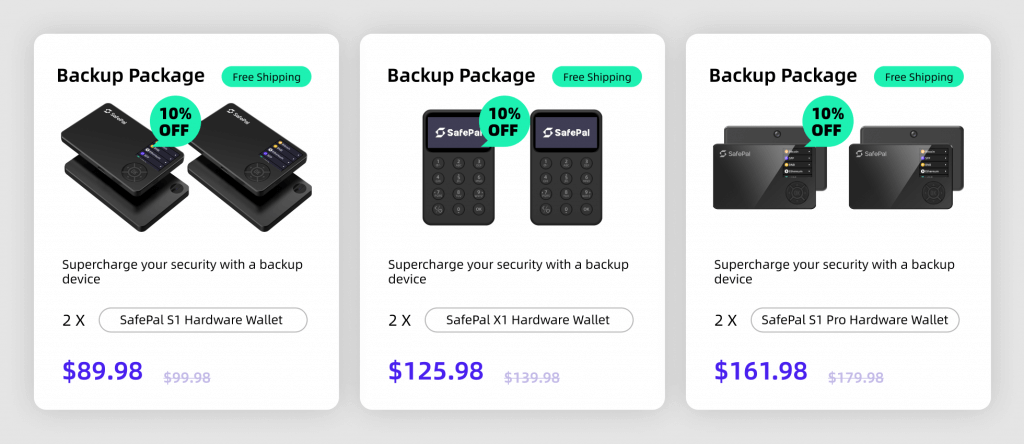
The SafePal ecosystem provides a complete set of tools for anyone who wants to hold, trade, or grow their digital assets without using a middleman. You get three main choices: the mobile app, the browser extension, and the physical hardware wallets like the S1, S1 Pro, and the X1.
The company started back in 2018 with backing from Binance Labs, and it has grown to serve over 25 million users across the globe. Actually, the main selling point is the air-gapped security. It means the hardware device never touches the internet, Bluetooth, or even a USB cable while you sign a transaction. Well, this makes it nearly impossible for a remote hacker to touch your private keys.
Read: Best cold wallets for cryptocurrency
Here is a quick SafePal wallet review (overview)
| Launch year | 2018 |
| Founder/Backers | Veronica Wong, backed by Binance Labs, Animoca Brands, Superscrypt |
| User base | Over 25 million users in 200+ regions |
| Wallet types | Hardware (S1, X1, S1 Pro); Mobile app (iOS/Android); Browser extension; Telegram mini app |
| Supported blockchains | 200+ public chains (Bitcoin, Ethereum, BNB Smart Chain, Solana, Tron, Arbitrum, Base, etc.) |
| Supported assets | 30,000+ coins/tokens and unlimited NFTs; Custom tokens can be added via contract address |
| Languages | 16 languages |
| Hardware price range | S1: $49.99; X1: $69.99; S1 Pro: $89.99 (excluding taxes/duty) |
| Security certifications | Secure element chips rated CC EAL5+ (X1) or EAL6+ (S1, S1 Pro); air‑gapped signing (S1, S1 Pro) |
| Self‑destruct & passphrase | Built‑in self‑destruct sensor wipes keys if tampering is detected. Optional passphrase adds hidden accounts |
| Notable features | dApp browser; cross‑chain swapping & bridging; NFT gallery; DeFi yield aggregator; CeDeFi banking; perpetual trading; Telegram mini app |
| On‑ramp/off‑ramp | Buy crypto via partners (MoonPay, Simplex); Sell back to fiat; Swiss IBAN accounts with MasterCard/Visa |
| Swap fees | In‑app swap/bridge fee of 0.2% plus network gas and provider charges |
| App ratings | App Store rating ~4.9/5; Google Play rating 4.5/5 |
| Known hacks | No confirmed hacks |
What I like (Pros)
- Affordable hardware wallet: You can actually get a fully air‑gapped S1 for about $49.99 only, while the upgraded S1 Pro costs only $89.99. Now, you see, competing devices like Ledger Nano X or Trezor Safe 5 often cost two to three times as much. The low entry price makes cold storage accessible.
- Comprehensive asset support: SafePal covers 200+ blockchains and over 30,000 coins and tokens. Also, if your token isn’t pre‑loaded, you can even add it by pasting the smart contract address.
- Unified ecosystem: You can easily manage your hardware device, software app, and even browser extension under one account.
- Built‑in DeFi and CeFi: The app lets you swap tokens across chains, stake assets, access Hyperliquid perpetual contracts (up to 40x leverage), deposit into Morpho Vaults, or bridge to other networks. Plus, SafePal’s Swiss‑licensed banking gateway also gives you a personal IBAN account with 0.4% top‑up fee and a MasterCard that works at 40 million merchants. You can also buy crypto with 35+ fiat currencies and withdraw to fiat when needed.
- Staking and yield aggregator: SafePal Earn collects staking options and DeFi pools in one place. You can filter by network, protocol, APY, and risk rating, and then deposit directly from your wallet.
What I Don’t Like (Drawbacks)
- No native desktop application: You will get a browser extension but not a standalone desktop app for Windows, macOS, or Linux.
- Learning curve for air‑gapped signing: The QR code workflow on the S1 and S1 Pro involves scanning codes back and forth between your phone and hardware device. Generally, new users can find this process awkward compared with devices that use USB or Bluetooth for signing. The X1 offers Bluetooth but sacrifices a full air gap mode.
- Dependence on the mobile app: Even if you own a hardware device, you still need the mobile app to initiate transactions, update firmware, and access features like staking. Basically, if your phone dies, you can’t use the hardware wallet alone.
- Small screen: The screen on SafePal devices, especially S1, feels quite small, so reading full wallet addresses and transaction details can be a bit uncomfortable during verification.
- Plastic build quality (S1 model): The S1 model uses a plastic body, so it can feel a bit like a cheap toy in hand and may not feel as premium or durable as metal wallets.
Read more: best crypto hardware wallets
What are the Best SafePal Alternatives to Buy?
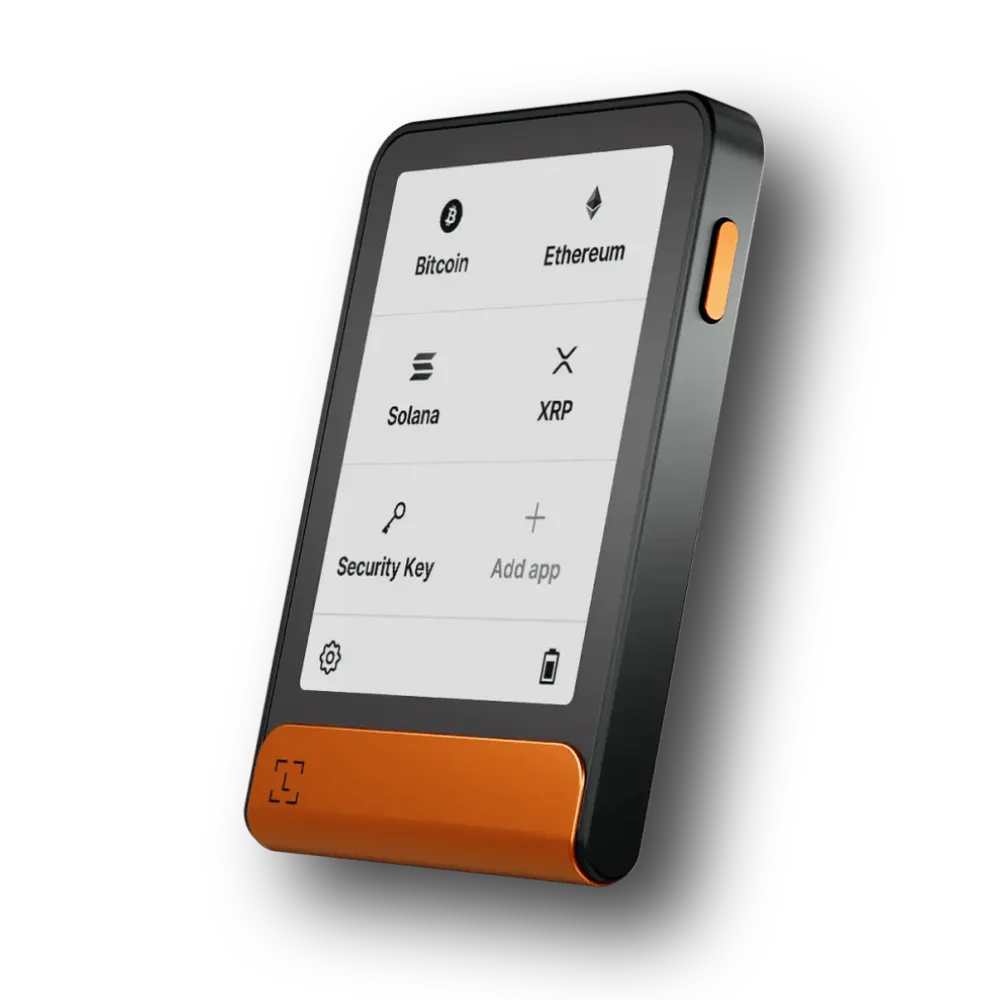
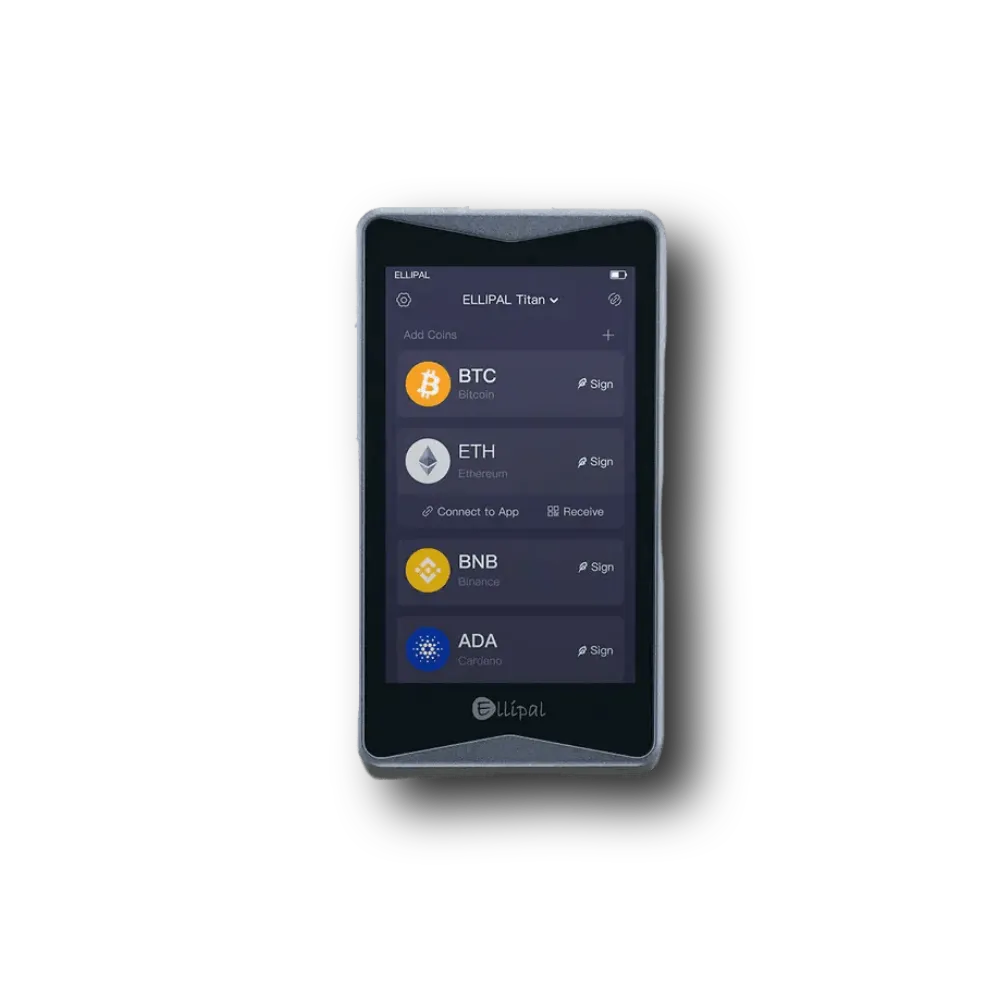
The top alternatives to the SafePal crypto wallet are Ledger Flex, Trezor Safe 5, and ELLIPAL Titan 2.0…
Is SafePal Hardware Wallet Safe to Use?
Yes, SafePal hardware wallets are very safe to use because they use a secure element chip and a 100% offline signing process. You will never connect the S1 or S1 Pro to the internet, Bluetooth, or even a USB cable during a transaction.
Basically, every action requires you to scan a QR code with your phone and then scan one back with the device. Honestly, this air-gapped method is one of the best ways to stop remote hacks. The device also has a self-destruct mechanism inside, so the chip will erase all your data if it detects someone trying to physically break into the hardware.
You can even create a passphrase‑protected hidden wallet in addition to your main accounts. The secure chip is a CC EAL 6+ or EAL 5+ grade. Well, this is the same chip used in bank cards and passports. Also, no SafePal wallet has been publicly hacked to date.
What about the SafePal software app; is it secure also??
The mobile app and browser extension are hot wallets. Hence, they store encrypted private keys on your phone or computer. SafePal encrypts those keys with your password, biometric data, or pattern lock, and does not store them on its servers.
The app supports BIP39/BIP44 standards, so you can import or export your seed phrase to other wallets if needed. Here, you also have the option to connect the app to a hardware cold storage device; in that case, the app only acts as an interface, and the private keys never touch your phone.
Now, there are many security features within the app as well. It includes anti‑phishing warnings, transaction simulation (previewing gas fees and output addresses before signing), and the ability to hide sensitive tokens or accounts. The app regularly removes scam dApps; according to SafePal’s annual recap, over 2400 malicious dApps were blocked.
How Many Cryptocurrencies are Supported by the SafePal Wallet?
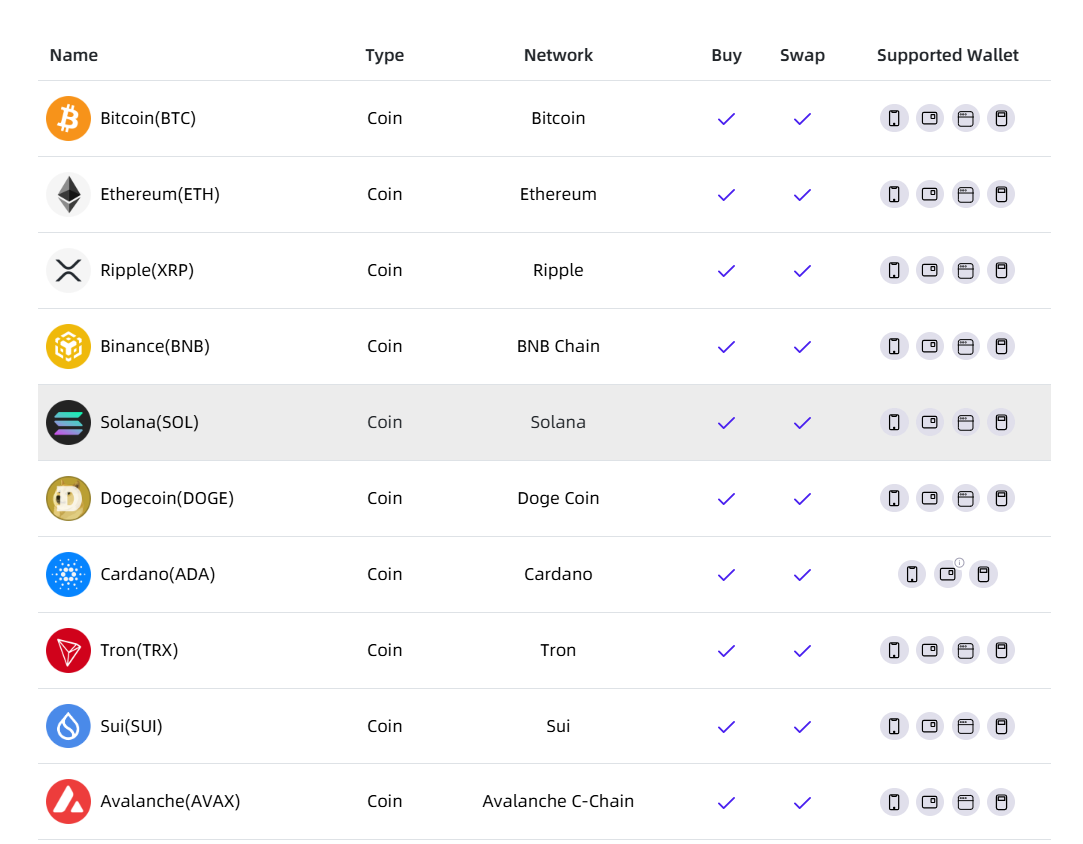
SafePal supports over 100 million different assets across more than 200 blockchains. You can store all the big names like Bitcoin, Ethereum, Solana, and Cardano without any issues. The platform is especially good for people who like to find small, new tokens on chains like Base, Arbitrum, or Polygon.
Basically, you will find almost every coin that is listed on major exchanges. Plus, the wallet also handles NFTs from many different networks. Your NFTs display with their artwork, and you can view details like token ID and collection. You can also mint NFTs directly through dApps within the browser. You can even add custom networks if you have the RPC details.
Types of SafePal Wallet (Comparison)
SafePal offers 3 hardware models (S1, S1 Pro, and X1) + software app options. The comparison table below highlights their core differences:
| Feature | S1 | X1 | S1 Pro |
|---|---|---|---|
| Price | $49.99 | $69.99 | $89.99 |
| Screen | 1.3 inch color (320×320) | 1.8-inch monochrome (128×64) | 1.3 inch color (320×320) |
| Connection method | Air‑gapped QR codes | Bluetooth 5.0 & USB‑C | Air‑gapped QR codes |
| Secure element | CC EAL6+ chip | CC EAL5+ chip | CC EAL6+ chip |
| Battery | 400 mAh | 200 mAh | 500 mAh |
| Self‑destruct | Yes | No (relies on physical PIN and firmware to wipe keys) | Yes (enhanced sensors) |
| Open source | Closed-source firmware | Fully open source firmware | Closed-source firmware |
| Passphrase support | Yes | Yes | Yes |
What Features Does the SafePal App Offer?
Cross‑Chain Swaps and Bridges
SafePal integrates multiple decentralized exchanges and cross‑chain protocols so you can swap tokens across chains without leaving the wallet. Basically, it combines both decentralized and centralized liquidity (including Binance’s mini‑program), claiming swap rates up to 4x better than MetaMask.
It even supports cross‑chain bridges on chains like Ethereum, BNB Chain, Polygon, Solana, Avalanche, Arbitrum, Optimism, Base, and more. You can also bridge stablecoins like USDC or USDT between chains.
DeFi Yield Aggregator (SafePal Earn)
Well, this section combines staking and liquidity mining opportunities from various protocols. You can easily browse pools by network, project, and expected APY, with clear risk ratings and lock‑up periods.
The aggregator supports tokens like ETH, SOL, Dai, SFP, and stablecoins, and integrates partners such as Kiln, Puffer Finance, and Morpho Vaults. Plus, SafePal Earn also offers promotional “Giftbox” events where you can earn extra rewards or limited‑edition hardware wallets for completing tasks.
Related: Best crypto hardware wallet for staking
NFT Marketplace and Gallery
SafePal has a built‑in NFT gallery. You can view, send, and receive NFTs across supported blockchains. The wallet connects to NFT marketplaces so you can buy, sell, or mint collectibles directly.
Read: Best cold wallets for NFTs
DApp Browser
There is a Web3 browser inside the app that lets you access decentralized exchanges, lending platforms, games, and social apps without exposing your private keys.
Now, when you open a dApp, the browser requests your approval for connection. SafePal reviews and blocks known scam dApps. You can easily use Hyperliquid for perpetuals trading, Polymarket for predictions, and specialized hubs for Solana and DeFi.
CeDeFi Banking Gateway
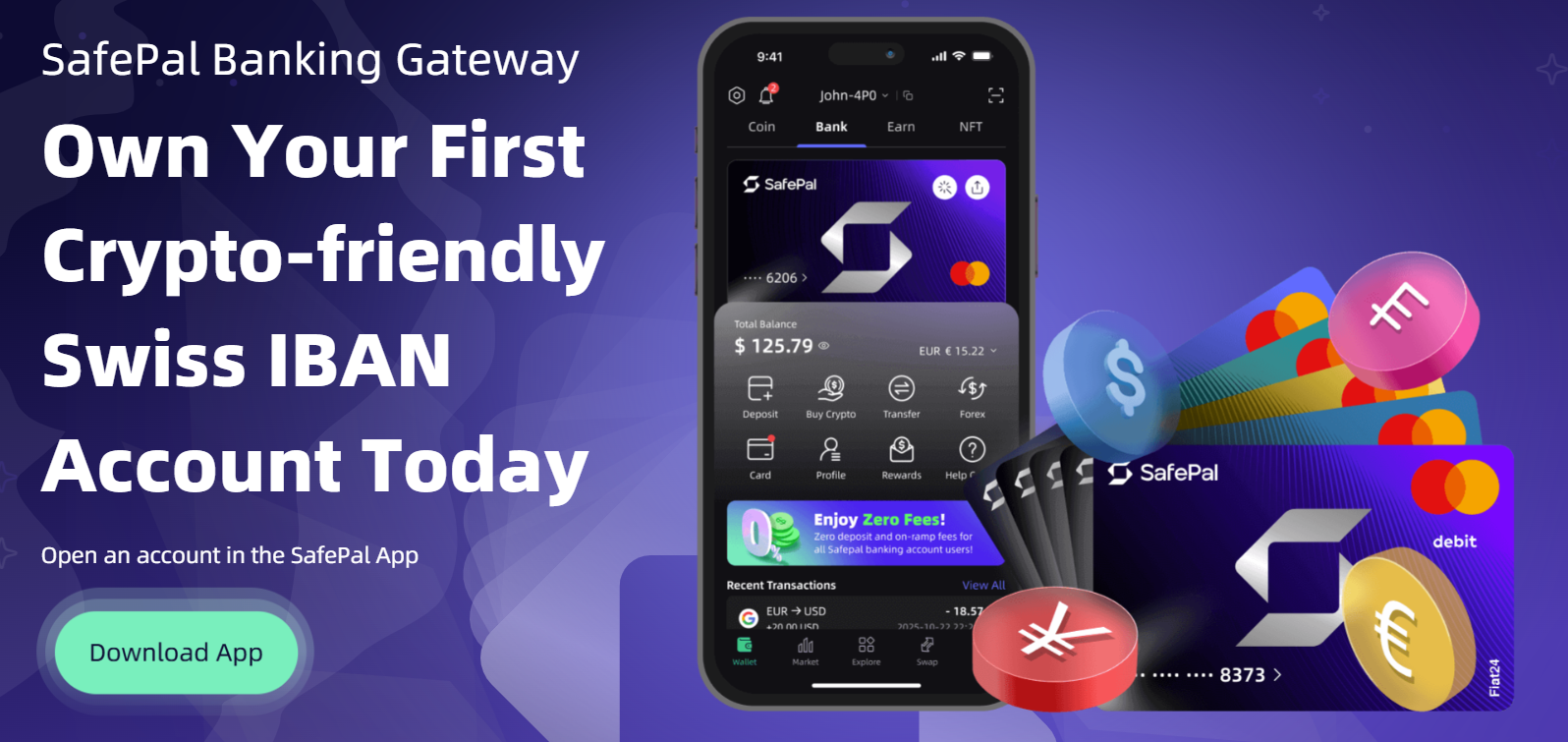
The SafePal Bank is a licensed service powered by Fiat24. So, you can open a Swiss IBAN account with no setup or management fees, convert crypto to fiat, and then spend via a virtual or physical MasterCard.
Here, generally, top‑ups cost around 0.4%, and you can pay at more than 40 million merchants worldwide (including online platforms like Airbnb, eBay, and Uber).
SafePal occasionally releases limited‑edition card designs (e.g., New Year 2026 and Valentine’s Day 2026) and offers promotions where new users can claim a free X1 hardware wallet when opening an IBAN account before certain dates.
Portfolio Tracker and Alerts
The app consolidates your holdings across all supported blockchains and shows market charts with real‑time prices from CoinGecko. You can easily check balances, transaction history, gas fees, and swap records, and you can set alerts for price movements.
Also, for active traders, the app integrates Hyperliquid and KiloEx modules to trade perpetuals with up to 40x leverage, all this directly from your SafePal crypto wallet app.
Are There Any Fees for Using SafePal?
SafePal is free to download, and you pay a one‑time cost for the hardware device (if you choose one). There are, however, some fees you should be aware of:
- Swap and bridge fee: SafePal charges a 0.2% fee on each swap or cross‑chain bridge order within the app. You will also pay network gas fees and any third‑party provider fees (e.g., 1inch, Binance, Hyperliquid).
- On‑ramp fees: You know, you can buy crypto through partners like MoonPay, Ramp, or Simplex. Well, this also includes service fees that are built into the quoted price. The CeDeFi bank charges about 0.4% when you top up your account with crypto. Plus, traditional card purchases may incur extra fees depending on your payment method.
- Network gas fees: All blockchain transactions (sending, swapping, staking) require gas fees determined by network congestion. Generally, SafePal displays estimated gas costs before you confirm the transaction.
- Hardware upgrades: Firmware updates are free, but if you want added accessories like the “Cypher Seed Board” for seed storage or a “leather case” for protection, those cost extra.
How User-Friendly is SafePal Crypto Wallet?
SafePal is generally very user-friendly, but there is a small learning curve if you use the air-gapped hardware. You have to get used to the “scan and scan back” process, which can obviously be a bit slow at first.
But again, once you do it a few times, it becomes second nature. The mobile app has a clean design, and everything is organized into simple tabs. Basically, it’s kinda like a banking app, you have your assets, your trades, and your dApps in separate sections. Plus, the navigation is intuitive for most people who have used a smartphone before.
Now, the hardware buttons on the S1 and S1 Pro are also just a simple D-pad. You can use them to move through menus and type your PIN. Okay, typing a long passphrase with a D-pad is a bit annoying, but you don’t have to do it often.
The X1 model actually has a full keypad, so it makes it much easier to enter codes. Hence, all in all, the setup process is guided by clear instructions on the screen. Mostly, the platform is great for beginners who want a professional setup without being too overwhelmed.
How to Download, Set Up, and Use SafePal Wallet?
Step 1: Download the SafePal App
Download the latest SafePal App from www.safepal.com/download or scan the download QR code provided on the official website. You must ensure you are using the official link to avoid fake versions that could steal your funds.
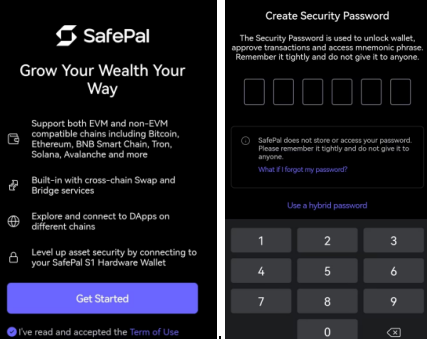
Step 2: Set up the Security Password
The first step to setting up the SafePal App is to set a Security Password. The Security Password of the SafePal App is a set of six numbers that are used to unlock the wallet, approve transactions, access the mnemonic phrase, and change the security settings, such as fingerprint, pattern, and fast payments.
Since SafePal does not store your private key, seed phrase, or password, once the Security Password is set, you should remember it tightly.
Step 3: Set up the fingerprint and pattern (Optional)
You see, fingerprints and patterns are two useful features to save your effort in signing a transfer or authorizing a DApp login.
Basically, when you have set a fingerprint, for example, you can enable it for signing in to the App settings, so that you don’t need to enter the “Security Password” at every transfer. Okay, fingerprint and Pattern are optional; if you don’t want to set one, just feel free to skip it.
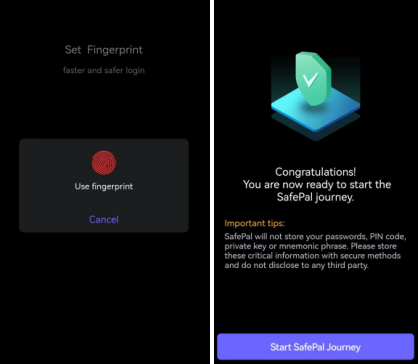
Step 4: Create a software wallet
Now, once the App setup completes, the next step is to add a wallet. So, to create a new software wallet, click ‘Software Wallet’— ‘Create a new wallet’, and enter the Security Password that you set at Step 2.
Then you can easily set the wallet name and click ‘Continue’ to complete the wallet creation. Now, at this step, you can utilize the “Advanced” feature to select how many seed words you want to create for the mnemonic phrase.
SafePal software wallet supports both generating 12 and 24 seed words. And the Passphrase feature in the Advanced setting is an optional setting used to create a hidden wallet under the mnemonic phrase.
So, if the Passphrase is lost, the Passphrase-enabled wallet will be lost too, so please be careful if you choose to set a Passphrase.
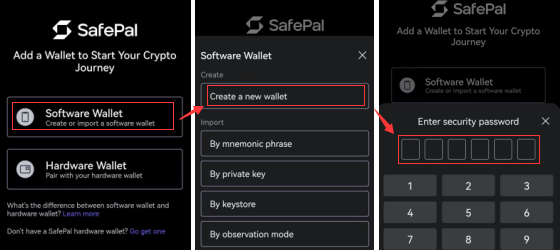
Step 5: Back up the mnemonic phrase
As a decentralized wallet, SafePal doesn’t store any of your personal information, such as password, mnemonic phrase, or Passphrase. Also, if you lose your mnemonic phrase, you lose the crypto funds stored in it. So do remember to back up your mnemonic phrase in time.
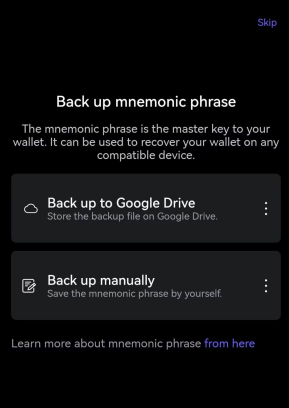
Step 6: Add your favorite coins/tokens into the wallet
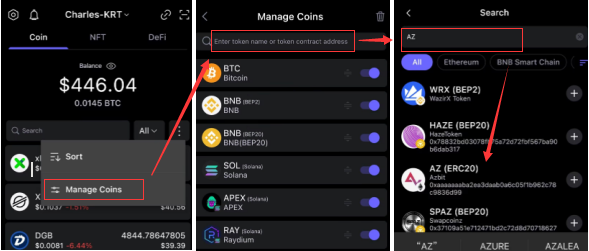
Now that you have set up a SafePal software wallet successfully, the last step is to add your favorite coins/tokens into the wallet.
You can click the ‘three dots’ icon to navigate to the coin management interface, and then click the ‘Manage Coins’ icon, search for your favorite coins/tokens, and then you can add them to the asset list.
Conclusion: Is SafePal Reliable & Trustworthy?
To sum up my SafePal wallet review, it is definitely one of the most reliable and trustworthy cold wallet choices for crypto storage. You get a lot of security features for a very low price compared to the competition. The backing from Binance Labs gives the company a lot of credibility in the industry.
The hardware devices offer strong security through air‑gapped signing, CC EAL6+ secure elements, and self‑destruct features. The software app provides an all‑in‑one hub for swaps, staking, NFTs, banking, and even leveraged trading. Well, no wallet is 100% safe if you are careless, but SafePal gives you all the tools to stay protected.
FAQs: SafePal Wallet Review
Is there any notable hack on SafePal wallets?
SafePal has never had a documented case where the hardware device itself was hacked remotely. Most “hacks” you hear about are actually phishing scams where the user accidentally gave their seed phrase to a fake website.
The hardware’s air-gapped design makes it basically impossible for a hacker to get in without physical access to the device and your PIN. Basically, the system is very robust as long as you follow basic security rules.
Can I buy crypto in the SafePal app?
Yes. SafePal partners with on‑ramp providers like MoonPay, Ramp, Transak, and Simplex to let you buy more than 35 cryptocurrencies using a bank card or Apple Pay/Google Pay. The banking gateway also allows direct top‑ups into your Swiss IBAN account.
Which is better: SafePal cold wallet or hot wallet?
A SafePal cold wallet (hardware) is much better for security because it keeps your private keys completely offline. You should use the cold wallet for your long-term savings and large amounts of money.
The hot wallet (app only) is okay for small amounts and daily trades because it is faster to use. Generally, most people start with the app and then buy the hardware once their portfolio grows.
Does it support NFTs and staking?
SafePal fully supports NFTs from various chains like Ethereum, Solana, and Polygon directly in the app. You can see your collection and send them to other wallets very easily.
The wallet also offers staking through the “SafePal Earn” section, where you can earn rewards on your coins. It is a very powerful feature for making passive income.